Show off your final renders
-
Sebastian
- Posts: 156
- Joined: Wed Feb 28, 2007 9:16 am
Post
by Sebastian » Wed Sep 05, 2007 1:10 am
Here is a little test I did with Indigo and Blender which shows a faked-M-Blur Image.

-
Attachments
-
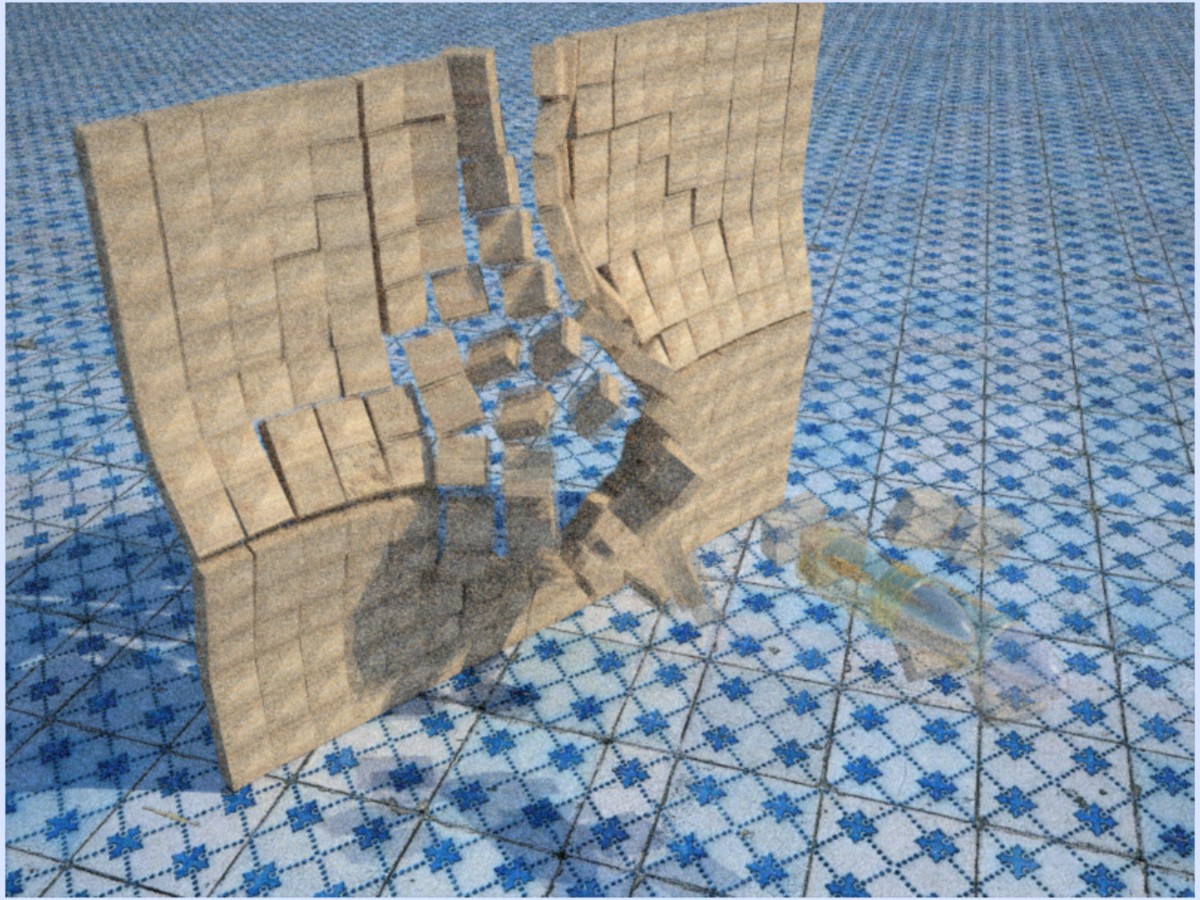
- FakeMBlur.jpg (318.36 KiB) Viewed 15262 times
-
OnoSendai

- Posts: 6244
- Joined: Sat May 20, 2006 6:16 pm
- Location: Wellington, NZ
-
Contact:
Post
by OnoSendai » Wed Sep 05, 2007 1:18 am
Cool, can you tell us how you did it?
-
Stur
- Posts: 594
- Joined: Fri Nov 10, 2006 11:52 pm
- Location: Nancy, France
Post
by Stur » Wed Sep 05, 2007 1:19 am
A little bit noisy but interesting.
Did you overlap two pictures ?
(Bullets' casing usually stay in the gun though  )
)
-
Sebastian
- Posts: 156
- Joined: Wed Feb 28, 2007 9:16 am
Post
by Sebastian » Wed Sep 05, 2007 3:00 am
A little bit noisy but interesting.
Did you overlap two pictures ?
Yes that's it ^^
-
OnoSendai
- Posts: 6244
- Joined: Sat May 20, 2006 6:16 pm
- Location: Wellington, NZ
-
Contact:
Post
by OnoSendai » Wed Sep 05, 2007 3:08 am
You should try overlapping like 10 images

-
Kram1032
- Posts: 6649
- Joined: Tue Jan 23, 2007 3:55 am
- Location: Austria near Vienna
Post
by Kram1032 » Wed Sep 05, 2007 3:31 am
yeah, then, you get a less "ghostish" look
blender overlaps 16 pics, as far as I know ^^ - your transparency needs to in/decrease logarithmically or exponentially, for sure^^ - but as a start, linear overlay, should be fine
-
OnoSendai
- Posts: 6244
- Joined: Sat May 20, 2006 6:16 pm
- Location: Wellington, NZ
-
Contact:
Post
by OnoSendai » Wed Sep 05, 2007 3:41 am
Actually each individual image should be equally weighted.
-
Kram1032
- Posts: 6649
- Joined: Tue Jan 23, 2007 3:55 am
- Location: Austria near Vienna
Post
by Kram1032 » Wed Sep 05, 2007 3:48 am
really? shouldn't there be a fadeoff, from longer in the past lighting? that should be slightly darker and less visible than later rays that hit the camera.... !?
-
OnoSendai
- Posts: 6244
- Joined: Sat May 20, 2006 6:16 pm
- Location: Wellington, NZ
-
Contact:
Post
by OnoSendai » Wed Sep 05, 2007 4:18 am
no.
-
CTZn
- Posts: 7240
- Joined: Thu Nov 16, 2006 4:34 pm
- Location: Paris, France
Post
by CTZn » Wed Sep 05, 2007 4:32 am
Excellent Idea !!!
Well the fade off impression is created only by superposing images, they are more opaque where the object overlaps.
Wow !!!
obsolete asset
-
Insquall
- Posts: 12
- Joined: Thu Nov 16, 2006 5:22 am
Post
by Insquall » Wed Sep 05, 2007 5:34 am
if the overlapped images were HDR that would be awesome.
-
Nortmobile
- Posts: 13
- Joined: Wed Jan 31, 2007 9:49 am
Post
by Nortmobile » Wed Sep 05, 2007 5:47 am
That's an interesting technique. Hello Sebastian, I will be your thread jacker for today! I have a blender question that really has nothing to do with indigo. How did you make the wall? Is it just an object array? I'm trying to do something similar with a solid body simulation, which I will then render in indigo, but I can't seem to setup the scene correctly. Sorry, I know this isn't the best place for this question.
I've create a thread in the Off-Topic forum
Blender rigid body simulation with a relatively confusing explanation of what I'm trying to do.
Last edited by
Nortmobile on Wed Sep 05, 2007 7:08 am, edited 1 time in total.
-
CTZn
- Posts: 7240
- Joined: Thu Nov 16, 2006 4:34 pm
- Location: Paris, France
Post
by CTZn » Wed Sep 05, 2007 6:21 am
Maya user here, but at the beginning of the sim there must be a gap between tiles, or the solver cant do its job, hope that helps.
obsolete asset
-
BbB
- Posts: 1996
- Joined: Fri Feb 09, 2007 8:28 am
- Location: Berlin
-
Contact:
Post
by BbB » Wed Sep 05, 2007 9:51 am
Funny, but the overlapping gives your image this Maxwell, soft-edged look...
Who is online
Users browsing this forum: No registered users and 84 guests


