Night Render Issues

Get feedback from others on your works in progress
Post Reply
9 posts • Page 1 of 1
User avatar
Frutiger
Posts: 122
Joined: Wed May 05, 2010 4:05 am
Location: Northern California

Night Render Issues

Post by Frutiger » Wed Mar 16, 2011 4:03 pm

Hello again, Indigo renderer community.

I've been working on lighting plans recently, and there's no better time to show off a good lighting plan than at night. I think we're all aware that the main issue here is a complete lack of ambient (ie MOON) light. Here's an example.
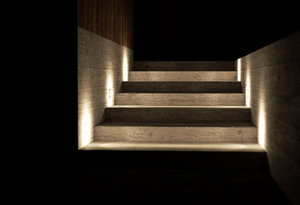
EXT-Lighting-Focus-Success.jpg
LIke the goddamned sun went out.
I'm sure I'm not the first person to run into this problem. So I was hoping I could maybe hear about some people's workarounds and fixes to make it look like actual night time and not the interior of a black hole.

Here's another example.
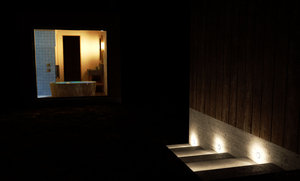
EXT-Lighting-Focus-NEW-MOON.jpg
Again, with the darkness.
I know one way of dealing with it is by jacking up the ISO or EV adjust until it gets filled, but that tends to burn out light sources.

See example:
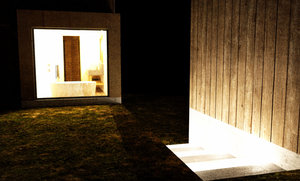
EXT-Lighting-Focus-BURNOUT.jpg
Toasty
So, are there any generally accepted workarounds for this issue while working in (Sk)Indigo?

Silmä
2nd Place Winner
Posts: 147
Joined: Fri Jun 26, 2009 7:46 am

Re: Night Render Issues

Post by Silmä » Wed Mar 16, 2011 7:08 pm

One good and tested solution to the lack of ambient lightning is to use an ambient light source... Say, a huge, blueish low intensity emitter or night-time hdri-map. It's possible to fake moonlight with the sun/sky model using light layers, but it's doesn't work very well with other light sources due to how Indigo handles layers.

User avatar
ENSLAVER
Posts: 399
Joined: Tue Feb 20, 2007 1:49 am

Re: Night Render Issues

Post by ENSLAVER » Wed Mar 16, 2011 7:46 pm

dark bluey purple environment, possibly on it's own layer if you want to play with it later.

There are A LOT of evening/dusk hdri's online, you just have to search around to find the free ones. I've seen some with moon and stars, and also lots of plainer evening ones, some with sunsets.
ex:

http://www.peterguthrie.net/blog/tag/hdr/ (not free)
http://www.hyperfocaldesign.com/sky-tex ... ction.html (not free)
http://crazy8studio.com/hdri.html (free - 7th one down might work well with some colour adjustments)
http://www.openfootage.net/?cat=15 (free - HDRI 360 degree gaisberg at night salzburg looks good)
http://bryceblog.bryce-alive.org/?paged=2 (free - scroll down, lots of night ones - low res)


Or, make your own hdri from Terragen, that way you can get the colours/clouds just right.
http://forums.cgsociety.org/showthread.php?t=298483
http://forums.planetside.co.uk/index.php?topic=36.0

Still if you aren't going to see a lot of the sky/reflections best just to use environment colour. The purble bluey works well with lights because most lighting is a warmer colour, purple is the opposite and can really make stuff jump out.

examples of bluey purple environment:
http://sentimentalfreak.deviantart.com/ ... -164765520
http://sentimentalfreak.deviantart.com/ ... -164773868

StompinTom
Indigo 100
Posts: 1828
Joined: Mon Sep 04, 2006 3:33 pm

Re: Night Render Issues

Post by StompinTom » Thu Mar 17, 2011 1:32 am

Night are shots usually aren't exactly *night* shots but rather dusk shots. Ambient blue light carries the sense of darkness and night while still allowing you to see what's going on. A perk of this too is that the ambient light nicely contrasts with artificial (usually warm) lights, which is what makes dusk shots so pleasing.

User avatar
suvakas
3rd Place Winner
Posts: 2613
Joined: Mon Sep 04, 2006 11:08 pm
Location: Estonia
Contact:

Re: Night Render Issues

Post by suvakas » Thu Mar 17, 2011 2:05 am

Just a simple dark environment color has done the trick for me in this kind of situations.

User avatar
Bosseye
Posts: 312
Joined: Fri Jan 01, 2010 10:52 pm
Location: Bristol, UK

Re: Night Render Issues

Post by Bosseye » Thu Mar 17, 2011 3:26 am

I've done this before by just changing the default sketchup background colour (in styles) to something dark purple/blue and then in render settings change environment to 'sketchup background colour' and leave the black box unchecked. Gives everything a nice dusky, purple hue which as Tom says above contrasts nicely with the artificial lighting.

User avatar
Zom-B
1st Place 100
Posts: 4701
Joined: Tue Jul 04, 2006 4:18 pm
Location: ´'`\_(ò_Ó)_/´'`
Contact:

Re: Night Render Issues

Post by Zom-B » Thu Mar 17, 2011 3:36 am

how about a simple gradient from dark Blue to black (starting in midle of the black image).
So you have a bluish horizon and a black sky. The image can even stay 1 pixel with ;)
polygonmanufaktur.de

User avatar
dcm
Posts: 663
Joined: Sun Jan 03, 2010 1:55 am

Re: Night Render Issues

Post by dcm » Fri Mar 18, 2011 2:48 am

I think that using 150x150px blurred night hdri good option.
Or simple use env. color (no sun/sky) to dark blue and tweak via light layer + set intensity to 0.08 or similiar value - easiest way

User avatar
Frutiger
Posts: 122
Joined: Wed May 05, 2010 4:05 am
Location: Northern California

Re: Night Render Issues

Post by Frutiger » Tue Mar 29, 2011 9:53 am

I figured HDRI maps would be suggested. I'll give those a try first. I'll post results up when I get them all polished up.

Thanks for the all the ideas!

Post Reply
9 posts • Page 1 of 1

Who is online

Users browsing this forum: No registered users and 54 guests

