General questions about Indigo, the scene format, rendering etc...
-
BluShift
- Posts: 17
- Joined: Sat Aug 15, 2009 12:18 pm
Post
by BluShift » Mon Aug 31, 2009 6:06 pm
Hey everyone... Don't really know whats up with this, but I have some strange firefly's happening in this render around the top part of the syringe

I'm using SketchUp, Skindigo, and Indigo 1.1.18, I am rendering with Bidir MLT, and I have no exit portals. I have NO idea what I might be doing wrong, the image below is rendered to ~290 spp.
Do I need to render it longer for all those firefly's to go away, or is it the type of raytracing I'm using?
The noob needs help

-
Attachments
-
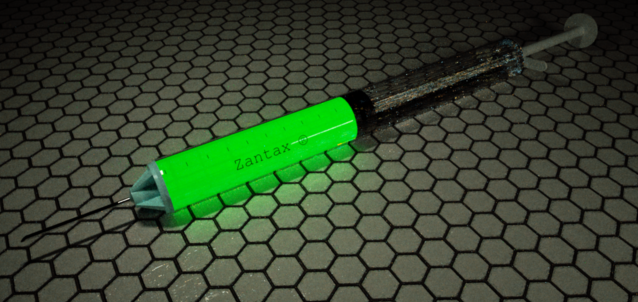
- Notice the firefly's around the upper part of the syringe.
- im1251696972.png (325.71 KiB) Viewed 8878 times
-
Godzilla

- Posts: 985
- Joined: Sat Jun 06, 2009 11:33 am
Post
by Godzilla » Mon Aug 31, 2009 6:13 pm
Just let it render longer.

It's normal. Or try using a more up-to date version if you would like it to render faster.
-
BluShift
- Posts: 17
- Joined: Sat Aug 15, 2009 12:18 pm
Post
by BluShift » Mon Aug 31, 2009 6:15 pm
Lol seriously? I know 300 is generally a pretty good test render; what would you consider a "production use" spp count? I've never actually known
-
fused

- Posts: 3648
- Joined: Fri Sep 22, 2006 7:19 am
- Location: Berlin, Germany
- 3D Software: Cinema 4D
Post
by fused » Mon Aug 31, 2009 6:16 pm
BluShift wrote:Lol seriously? I know 300 is generally a pretty good test render; what would you consider a "production use" spp count? I've never actually known
It always depends on the scene but i'd say starting at 1000spp maybe

-
BluShift
- Posts: 17
- Joined: Sat Aug 15, 2009 12:18 pm
Post
by BluShift » Mon Aug 31, 2009 6:27 pm
fused wrote:BluShift wrote:Lol seriously? I know 300 is generally a pretty good test render; what would you consider a "production use" spp count? I've never actually known
It always depends on the scene but i'd say starting at 1000spp maybe
Holy efffffffff. Had no idea

I think I figured out the issue though; sketchup always makes circles with a very low number of sides (like 16, or 20 or something
) so the inside and outside of the syringe is technically angular and not really "round" so it's messing with the refraction.
Do you know how to increase the poly count of circles in SketchUp? Similiar to Blender's subdivide?
-
remus
- Posts: 133
- Joined: Fri May 02, 2008 8:07 am
Post
by remus » Mon Aug 31, 2009 7:03 pm
...or you could just redraw it with more segments.
Id let it cook for a little longer before you start messing with the model, though. 300 spp isnt a lot.
-
BluShift
- Posts: 17
- Joined: Sat Aug 15, 2009 12:18 pm
Post
by BluShift » Mon Aug 31, 2009 7:29 pm
remus wrote:...or you could just redraw it with more segments.
Id let it cook for a little longer before you start messing with the model, though. 300 spp isnt a lot.
How do you draw circles with more segments? Is this just a simple settings thing?
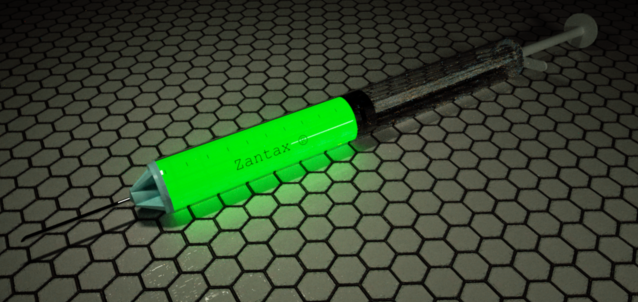
Oh, and update! 1800 spp, and no more fireflys! Looks like Godzilla was right
But, it is definitely a circle-subdivision issue; it's very obvious in the render below that there are just not enough segments for anything remotely realistic.
-
Attachments
-
- im1251696972.png (302.4 KiB) Viewed 8827 times
-
Pibuz

- Posts: 2646
- Joined: Tue Dec 11, 2007 7:58 am
- Location: Padua, Italy
- 3D Software: SketchUp
Post
by Pibuz » Tue Sep 01, 2009 12:30 am
BluShift wrote:
How do you draw circles with more segments? Is this just a simple settings thing?
Select the circle tool and just type a number of segments using the numpad!
Who is online
Users browsing this forum: No registered users and 28 guests


