Indigo vs Maxwell

General questions about Indigo, the scene format, rendering etc...
User avatar
manitwo
Posts: 1029
Joined: Wed Jul 05, 2006 4:50 am
Location: Tirol - Austria

Post by manitwo » Thu Oct 05, 2006 12:20 pm

for you riko-kun: :) :wink:

Indigo:
Image

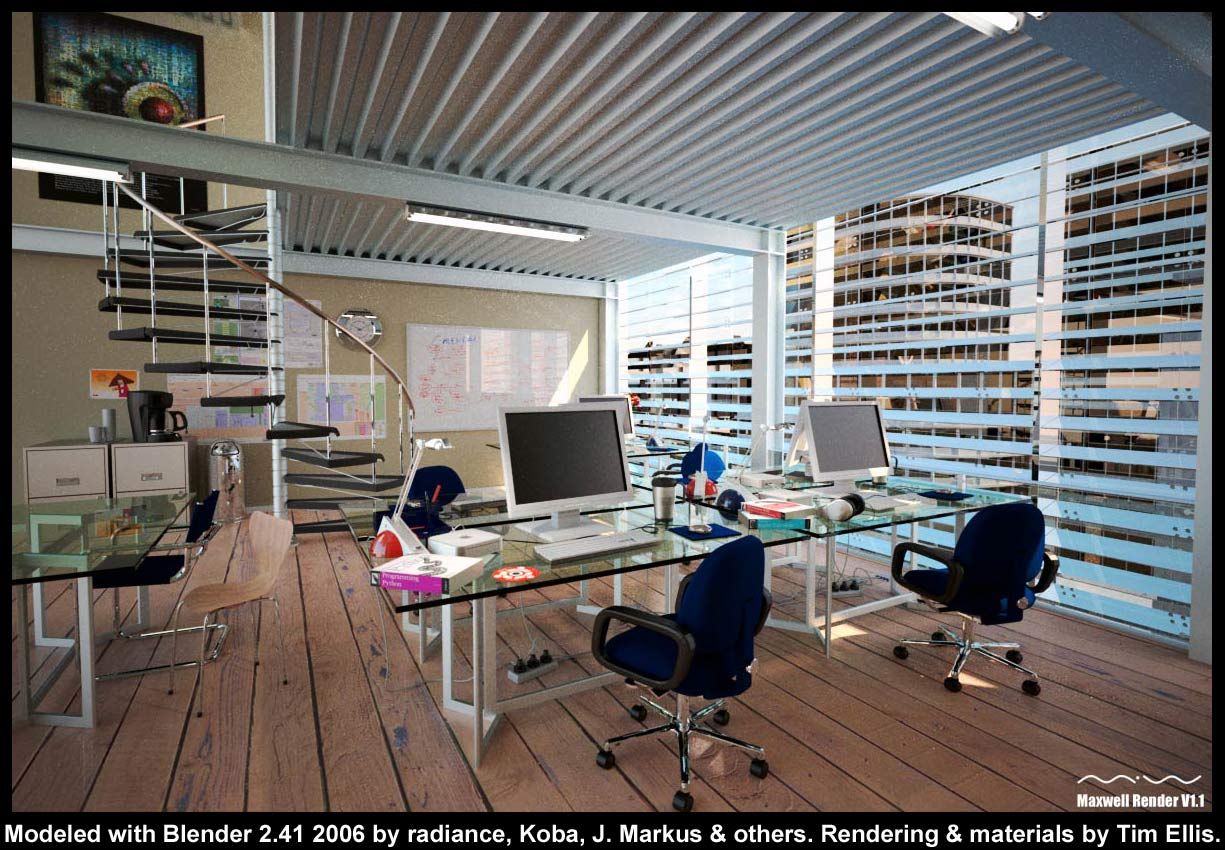
Maxwell:
Image

User avatar
eman7613
Posts: 597
Joined: Sat Sep 16, 2006 2:52 pm

Post by eman7613 » Thu Oct 05, 2006 12:38 pm

did they use post proc?
Yes i know, my spelling sucks

User avatar
manitwo
Posts: 1029
Joined: Wed Jul 05, 2006 4:50 am
Location: Tirol - Austria

Post by manitwo » Thu Oct 05, 2006 1:29 pm

... hmm well i don't know but he don't mentioned that he postpro this render. I think if Tim Ellis did, he would have wrote that 8)

User avatar
eman7613
Posts: 597
Joined: Sat Sep 16, 2006 2:52 pm

Post by eman7613 » Thu Oct 05, 2006 1:41 pm

i guess i should have also asked the time both took and whether or not the indigo one is post proc :roll: mind slip i guess
Yes i know, my spelling sucks

User avatar
Kosmokrator
Posts: 1141
Joined: Sat Jul 29, 2006 11:52 am
Location: Greece-Athens

Post by Kosmokrator » Thu Oct 05, 2006 5:25 pm

hey look at the trash can the indigo reflections are too clear and right in maxwell is a blurr thing .....come on this is THE INDIGO!
1)Core i7 965XE stock CLOCK ,PSU:CHIEFTEC 850W
M/B ASUS P6T DELUXE,WATERCOOLING ZALMAN RESERATOR 2
MEMORY:6GB CORRSAIR @1600,Ati HD 4870x2,
MONITOR:LG 1950SQ,CASE:THERMALTAKE SOPRANO

rikokun
Posts: 58
Joined: Wed Sep 27, 2006 7:44 pm

Post by rikokun » Thu Oct 05, 2006 7:44 pm

Kosmokrator> Yeah, but the Maxwell version is more natural looking. It basicly fits better together. Still, Indigo os for free, so i think it's mine renderer of choice ^_^ And it still even isn't in version 1, so...
I only wish it had semitransparent non-reflective materials ^_^

User avatar
Kosmokrator
Posts: 1141
Joined: Sat Jul 29, 2006 11:52 am
Location: Greece-Athens

Post by Kosmokrator » Fri Oct 06, 2006 3:19 am

the scene of maxwell have and interior lighting...i think this gives the more natural feeling...anyway maxwell is good but not for 1000e!what u think?
1)Core i7 965XE stock CLOCK ,PSU:CHIEFTEC 850W
M/B ASUS P6T DELUXE,WATERCOOLING ZALMAN RESERATOR 2
MEMORY:6GB CORRSAIR @1600,Ati HD 4870x2,
MONITOR:LG 1950SQ,CASE:THERMALTAKE SOPRANO

motorsep
Posts: 44
Joined: Mon Sep 18, 2006 3:08 pm
Location: San Antonio, TX
Contact:

Post by motorsep » Fri Oct 06, 2006 3:33 am

I wish Indigo would have material preview, because it sucks to wait ~10 hrs to see that materials are not quite right and then re-render whole scenen again :(

rikokun
Posts: 58
Joined: Wed Sep 27, 2006 7:44 pm

Post by rikokun » Fri Oct 06, 2006 6:30 am

motorsep> Amen to that...

User avatar
Tim Ellis
Posts: 6
Joined: Mon Oct 16, 2006 1:35 pm

Post by Tim Ellis » Mon Oct 16, 2006 2:08 pm

Hi people, I've just discovered these forums.

In reply to your questions regarding my Maxwell version of radiance's Indigo scene.

Yes I did use post process, this was stated in the original thread at elysiun.com.

You can view a natural Maxwell version without any post processing here:- http://i5.photobucket.com/albums/y198/_ ... ure_cr.jpg

The blue cast is from Maxwell's physical sky lighting system. The sun light is set to the correxct time of day, according to the clock on the wall.

The waste bin has smoothing errors, which I hadn't spotted until after the render had finished. If you look hard enough the desk lamp bases are also un smoothed.
This was due to my not selecting the Normals or High quality normals options when exporting in .OBJ from Blender. :oops:

Additional scene info:-

Rendered four times at 1200x800, each to a sample level of 16, then combined using Maxwell's co-op rendering system, to a combined sample level of 18.

Each render ran for 12 hrs, on a twin Opteron 244 (1.8Ghz) with 4Gb of RAM. 48hrs render time as opposed to Indigo's 108hrs.

Physical sky and sunlight with internal strip lights contributing, Sun position set to wall clock: 10:10am.

Tim.
Blended monkey.

User avatar
OnoSendai
Developer
Posts: 6244
Joined: Sat May 20, 2006 6:16 pm
Location: Wellington, NZ
Contact:

Post by OnoSendai » Mon Oct 16, 2006 9:41 pm

Hi Tim, welcome to the Indigo forums.
I love your work, perhaps you can make some renders with Indigo? :P :)

User avatar
manitwo
Posts: 1029
Joined: Wed Jul 05, 2006 4:50 am
Location: Tirol - Austria

Post by manitwo » Tue Oct 17, 2006 1:22 am

Hi Tim-Ellis

Welcome to this forum.
Now a maxwell master is here :lol: :P

engineman75
Posts: 2
Joined: Wed Oct 18, 2006 2:18 am
Location: Montreal, Canada

Post by engineman75 » Wed Oct 18, 2006 2:30 am

Hi everyone!

I am new to the forum and felt I should share a trick when testing scenes. To avoid needless hours of calculations, always do very small test renders (320x240) instead of production size (2000+ pixels). I learned this lesson years ago while working with Autodesk VIZ.

So far, my experience with Indigo has been great. I am trying to figure out a way to import AutoCAD models for rendering.

good luck.

engineman75

User avatar
manitwo
Posts: 1029
Joined: Wed Jul 05, 2006 4:50 am
Location: Tirol - Austria

Post by manitwo » Wed Oct 18, 2006 3:07 am

Welcome to the forum engineman75! :)

User avatar
joegiampaoli
Posts: 837
Joined: Thu Oct 05, 2006 7:12 am
Location: San Miguel de Allende-MEXICO
Contact:

Post by joegiampaoli » Wed Oct 18, 2006 9:47 am

engineman75 wrote: So far, my experience with Indigo has been great. I am trying to figure out a way to import AutoCAD models for rendering.
engineman75
Hi engineman75 and welcome, I am also new to indigo, and also new to blender, but that's another story.

If you already have a 3D model made in Autocad, you can try exporting it to 3DS format, then import it to Blender, in Blender you can assign some "kickbut" materials, then export it directly to indigo, remember to download the indigo exporter, any help, just ask us.

BTW, if you have not tried blender still for 3D, I strongly recommend it. I am doing the hard switch from windows to linux, soon I will be a free man...

Happy Rendering!!!
Last edited by joegiampaoli on Wed Oct 18, 2006 1:22 pm, edited 1 time in total.
Joe Giampaoli
Never tie a ship to a single anchor, nor life to a single hope
My Indigo Gallery

Post Reply
33 posts

Who is online

Users browsing this forum: No registered users and 29 guests