Feature requests, bug reports and related discussion
-
Alain
- Posts: 101
- Joined: Thu Aug 23, 2007 11:44 pm
Post
by Alain » Fri Aug 24, 2007 3:13 am
WOW my first success !

Looks pretty interesting yet

an one more question:
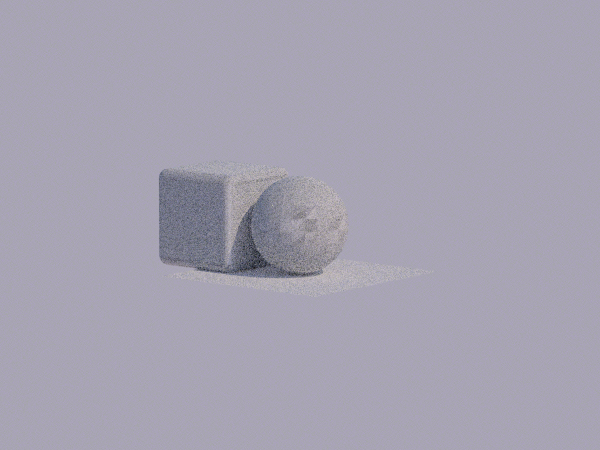
which parameter do I have to change to remove that "rauschen" in the picture ?
Regards
Alain
-
Attachments
-
- im1187881611.png (390.91 KiB) Viewed 3016 times
-
SmartDen

- Posts: 999
- Joined: Fri Oct 13, 2006 10:58 pm
- Location: Canary Islands
-
Contact:
Post
by SmartDen » Fri Aug 24, 2007 3:29 am
to remove noise from the picture you just have wait longer
-
Zom-B

- Posts: 4701
- Joined: Tue Jul 04, 2006 4:18 pm
- Location: ´'`\_(ò_Ó)_/´'`
-
Contact:
Post
by Zom-B » Fri Aug 24, 2007 3:39 am
Alain wrote:an one more question:
which parameter do I have to change to remove that "rauschen" in the picture ?

polygonmanufaktur.de
-
fused
- Posts: 3648
- Joined: Fri Sep 22, 2006 7:19 am
- Location: Berlin, Germany
- 3D Software: Cinema 4D
Post
by fused » Fri Aug 24, 2007 3:42 am
Alain wrote:@fused
will it be possible or is it already to test complex cinema scenes as you can see below with sub and subsub- objects ?
yes, that should be possible in cindigo 0.9.
but youll have to attach the object tag to every single object in the scene (dont attach it to null-objects!).
im thinking about removing the object tag... makes everything much easier
edit: thought about it. will remove it in the next release.
-
Zom-B
- Posts: 4701
- Joined: Tue Jul 04, 2006 4:18 pm
- Location: ´'`\_(ò_Ó)_/´'`
-
Contact:
Post
by Zom-B » Fri Aug 24, 2007 3:47 am
fused wrote:Alain wrote:
im thinking about removing the object tag... makes everything much easier
edit: thought about it. will remove it in the next release.
So normal smoothing will be controlled by the c4d phong tag?!
polygonmanufaktur.de
-
Alain
- Posts: 101
- Joined: Thu Aug 23, 2007 11:44 pm
Post
by Alain » Fri Aug 24, 2007 3:47 am
@SamrtDen and ZomB
LOL, ok, I see, I coudnt imagine that rendering can be so simpel
It means the longer I wait the better the result, is it an endless loop ?
-
Kram1032
- Posts: 6649
- Joined: Tue Jan 23, 2007 3:55 am
- Location: Austria near Vienna
Post
by Kram1032 » Fri Aug 24, 2007 3:52 am
Home Page wrote:
Welcome to indigorenderer.com
Indigo is a free, actively developed, physically-based unbiased render engine.
Employing advanced features such as Metropolis Light Transport, Spectral light calculus, a virtual camera model, physical sky and more, Indigo can achieve much more realistic results than traditional GI raytracers.
Indigo does not need any render parameters like GI samples, AO samples, AA samples, Soft shadows, etc, and complicated lightning setups to achieve realistic results.
Indigo is free for non- and commercial use, but as of writing is not open-source.
Want to know more ? Read the Indigo FAQ in our documentation section.
To get a feel of indigo's possibilities, visit our Artwork Gallery, or head over to the Main Download Page.
For some reason, the line with "progressive" is gone...
Anyway:
Indigo is a progressive renderer.
That means
it slowly builds up the picture, getting more and more clean and noisefree
-
Alain
- Posts: 101
- Joined: Thu Aug 23, 2007 11:44 pm
Post
by Alain » Fri Aug 24, 2007 4:02 am
@fused
Yes, that would be a good idea to remove the object tag.
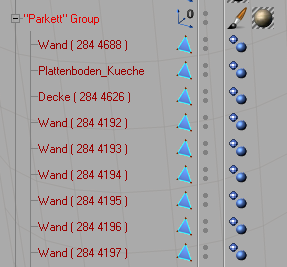
cause if I import CAD files into cinema I have hundret of polygonobjects.
And I mostly put them into an Nullobject to just add one material for all the objects in the nullobject.
ok, I could connect them to one object but that takes alot of boring work
or do you have another suggestion to save useless work ?
you see a sample of the treestructure that I mostly have if I import from a CAD program.
regards
alain
-
Attachments
-
- Nullobject_Tag.png (29.75 KiB) Viewed 2989 times
-
SmartDen
- Posts: 999
- Joined: Fri Oct 13, 2006 10:58 pm
- Location: Canary Islands
-
Contact:
Post
by SmartDen » Fri Aug 24, 2007 4:31 am
Alain wrote:@SamrtDen and ZomB
LOL, ok, I see, I coudnt imagine that rendering can be so simpel
It means the longer I wait the better the result, is it an endless loop ?
Exactly!
-
fused
- Posts: 3648
- Joined: Fri Sep 22, 2006 7:19 am
- Location: Berlin, Germany
- 3D Software: Cinema 4D
Post
by fused » Fri Aug 24, 2007 5:26 am
ZomB wrote:So normal smoothing will be controlled by the c4d phong tag?!
exactly.
-
Marcofly
- Posts: 407
- Joined: Thu Jun 29, 2006 12:51 am
- Location: Köln, Germany
Post
by Marcofly » Fri Aug 24, 2007 5:56 am
@Alain: i also import complex scenes in c4d, with trees similar to your example.. remember the command copy tag to children, it works fine!
don't forget you have also to assign uvw coordinates to every object, otherwise cindigo crashes!
fused is working on it.. next cindigo release will allow also other mapping types..
bye!!
-
fused
- Posts: 3648
- Joined: Fri Sep 22, 2006 7:19 am
- Location: Berlin, Germany
- 3D Software: Cinema 4D
Post
by fused » Fri Aug 24, 2007 6:10 am
probably not directly the next

having lots of trouble with custom GUIs atm. lotsa cahnges under the hood, much more stable, no real visible changes... dont expect tooo much

-
Alain
- Posts: 101
- Joined: Thu Aug 23, 2007 11:44 pm
Post
by Alain » Fri Aug 24, 2007 7:48 pm
@Marcofly
thanks for the hints
I will try it later with my interior scene, first I have urgently to finish other work, but I can't wait to try it
Regards
Alain
-
Marcofly
- Posts: 407
- Joined: Thu Jun 29, 2006 12:51 am
- Location: Köln, Germany
Post
by Marcofly » Fri Aug 24, 2007 7:55 pm
ZomB wrote:
So normal smoothing will be controlled by the c4d phong tag?!
it means: no phong tag=no normal smoothing? or how would you make it? in archviz most of the objects (walls, floor etc.) don't need smoothing..
Who is online
Users browsing this forum: No registered users and 59 guests


