Come here for help & support.
-
tornello
- Posts: 39
- Joined: Sat Aug 09, 2014 3:46 am
-
Contact:
Post
by tornello » Mon Dec 22, 2014 3:46 am
Hi, I have recently installed this version: Indigo Renderer v3.8.23, OS X 64-bit build
and now when I render
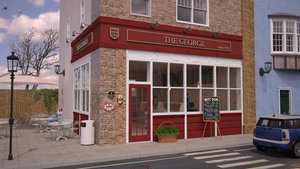
1) there are many bright dots that increase with time

(see image at 10000 samples/pixel)
2) if I use cpu rendering the image is dark and always with bright dots
Can you help me?
-
Attachments
-
-
CTZn
- Posts: 7240
- Joined: Thu Nov 16, 2006 4:34 pm
- Location: Paris, France
Post
by CTZn » Mon Dec 22, 2014 4:05 am
the bright dots are resulting from rare light paths that build up into varied caustics effects with time, but not always at a satisfactory rate; this is very much scene dependent. Super sampling is used in order to reduce their impact on the image. I like odd values personally, 3 or 5 generally.
obsolete asset
-
tornello
- Posts: 39
- Joined: Sat Aug 09, 2014 3:46 am
-
Contact:
Post
by tornello » Mon Dec 22, 2014 4:07 am
Hello,
I have used super sampling = 5
CTZn wrote:the bright dots are resulting from rare light paths that build up into varied caustics effects with time, but not always at a satisfactory rate; this is very much scene dependent. Super sampling is used in order to reduce their impact on the image. I like odd values personally, 3 or 5 generally.
-
CTZn
- Posts: 7240
- Joined: Thu Nov 16, 2006 4:34 pm
- Location: Paris, France
Post
by CTZn » Mon Dec 22, 2014 4:59 am
I would pehaps tend to use MLT that explores samples into clusters of points where single Path tracing would leave one, that's at this time a CPU only mode.
Get yourself used with the different tonemapping techniques, specially skip the Reinhard one if you feel that it is presenting a funny behaviour. Another factor that can enhance dots is too strong of a bump, and too bright or saturated colour. White shouldn't be above 85%.
obsolete asset
-
tornello
- Posts: 39
- Joined: Sat Aug 09, 2014 3:46 am
-
Contact:
Post
by tornello » Mon Dec 22, 2014 5:23 am
Thanks for you answers.
I think that it was more simple and natural with the other version when using default settings all was easy:
now suddenly all difficult.
CTZn wrote:I would pehaps tend to use MLT that explores samples into clusters of points where single Path tracing would leave one, that's at this time a CPU only mode.
Get yourself used with the different tonemapping techniques, specially skip the Reinhard one if you feel that it is presenting a funny behaviour. Another factor that can enhance dots is too strong of a bump, and too bright or saturated colour. White shouldn't be above 85%.
-
Oscar J

- Posts: 2204
- Joined: Sat Mar 31, 2012 3:47 am
- Location: Gothenburg, Sweden
- 3D Software: Blender
Post
by Oscar J » Mon Dec 22, 2014 6:53 am
If this is a new issue in Indigo 3.8.23, it's probably a bug.
-
tornello
- Posts: 39
- Joined: Sat Aug 09, 2014 3:46 am
-
Contact:
Post
by tornello » Mon Dec 22, 2014 6:55 am
so what can I install meanwhile?
Oscar J wrote:If this is a new issue in Indigo 3.8.23, it's probably a bug.
-
tornello
- Posts: 39
- Joined: Sat Aug 09, 2014 3:46 am
-
Contact:
Post
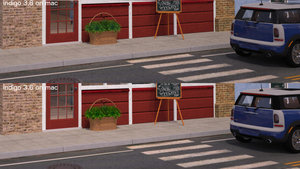
by tornello » Tue Dec 23, 2014 1:40 am
Oscar J wrote:If this is a new issue in Indigo 3.8.23, it's probably a bug.
-
Attachments
-
Who is online
Users browsing this forum: No registered users and 19 guests


