Announcements, requests and support regarding the Blender Indigo export script
-
Doug Armand

- Posts: 1038
- Joined: Fri May 16, 2008 5:49 pm
- Location: London UK
Post
by Doug Armand » Thu Jul 02, 2009 8:20 pm
Well it looks like I owe both Ono and Benn an apology.
Polinalkrimizei is right the fault is with 2.0.8.
I was sure I had tested it with 2.0.9 and that it still had the fault but I just re-installed it and textures render fine now.
So again my apologies

I shall crawl away now and see if I can find anymore phantom bugs

Doug
Doug Armand
-
WytRaven
- Posts: 905
- Joined: Mon Aug 27, 2007 8:24 pm
- Location: Dubbo, Australia
-
Contact:
Post
by WytRaven » Thu Jul 02, 2009 8:26 pm
I will ask again as my previous enquiry in another thread was ignored. Where is Indigo 2.09 for Mac?
If one thing needs to change in the back end business of indigo it is this:
Indigo releases should be simultaneous for all platforms at all bit levels. In other words a new indigo release should look like this.
Indigo 2.10 Linux 32 Bit
Indigo 2.10 Linux 64 Bit
Indigo 2.10 Mac 32 Bit
Indigo 2.10 Mac 64 Bit
Indigo 2.10 Win 32 Bit
Indigo 2.10 Win 64 Bit
It should look like that every time without exception.
Also when a paying customer asks a direct question to the business then the business should answer every time without exception. That is just basic customer service.
 "A foolish consistency is the hobgoblin of little minds..." - Emerson 1841
-
dakiru
- Posts: 747
- Joined: Mon Jun 22, 2009 6:51 am
Post
by dakiru » Thu Jul 02, 2009 10:41 pm
Doug Armand wrote:dakiru wrote:But, actually, there is no installation package for Blender 2.49a x64 - the latest at this moment:
I know - you basically point the installer to the /scripts folder of where 'YOU' have installed blender
I would be glad to do it, but after I click the OK button window disappears and nothing appears back.

-
WytRaven
- Posts: 905
- Joined: Mon Aug 27, 2007 8:24 pm
- Location: Dubbo, Australia
-
Contact:
Post
by WytRaven » Fri Jul 03, 2009 8:43 pm
Not sure if I've mentioned this before or not but the Mac version of Blendigo has no camera response functions available. This includes blendigo 2.09.
-
benn
- Posts: 1046
- Joined: Mon Dec 08, 2008 12:47 pm
- Location: Wellington, New Zealand
-
Contact:
Post
by benn » Mon Jul 06, 2009 3:09 pm
Thanks for the note @wytraven - i'll look into it.
-
dakiru
- Posts: 747
- Joined: Mon Jun 22, 2009 6:51 am
Post
by dakiru » Tue Jul 07, 2009 4:10 am
benn wrote:Thanks for the note @wytraven - i'll look into it.
Ben, can you please tell me something about my issue? About an impossibility of Blendigo 2.0.9 installation under Vista x64. It's upper in this thread. Thank you

-
benn
- Posts: 1046
- Joined: Mon Dec 08, 2008 12:47 pm
- Location: Wellington, New Zealand
-
Contact:
Post
by benn » Tue Jul 07, 2009 11:24 am
Dakiru - I'll update the blendigo installer so that it lets you manually specify a folder to install to if I can't find Blender in a standard location. Note that this will be plagued with problems because Blender is hard to install and plugins are hard to install and everyone will blame it on me.
Cest la vie.
The best thing to do would be to install Blender to c:\program files (x86)\Blender Foundation\Blender - then the installer should find it.
-
dakiru
- Posts: 747
- Joined: Mon Jun 22, 2009 6:51 am
Post
by dakiru » Tue Jul 07, 2009 1:58 pm
benn wrote:Dakiru - I'll update the blendigo installer so that it lets you manually specify a folder to install to if I can't find Blender in a standard location. Note that this will be plagued with problems because Blender is hard to install and plugins are hard to install and everyone will blame it on me.
Cest la vie.
The best thing to do would be to install Blender to c:\program files (x86)\Blender Foundation\Blender - then the installer should find it.
Thank you, Ben. No problem at all
-
benn
- Posts: 1046
- Joined: Mon Dec 08, 2008 12:47 pm
- Location: Wellington, New Zealand
-
Contact:
Post
by benn » Wed Jul 08, 2009 12:44 am
dakiru wrote:benn wrote:Dakiru - I'll update the blendigo installer so that it lets you manually specify a folder to install to if I can't find Blender in a standard location. Note that this will be plagued with problems because Blender is hard to install and plugins are hard to install and everyone will blame it on me.
Cest la vie.
The best thing to do would be to install Blender to c:\program files (x86)\Blender Foundation\Blender - then the installer should find it.
Thank you, Ben. No problem at all
Did that install blendigo ok for you?
-
dakiru
- Posts: 747
- Joined: Mon Jun 22, 2009 6:51 am
Post
by dakiru » Wed Jul 08, 2009 2:41 am
benn wrote:dakiru wrote:benn wrote:Dakiru - I'll update the blendigo installer so that it lets you manually specify a folder to install to if I can't find Blender in a standard location. Note that this will be plagued with problems because Blender is hard to install and plugins are hard to install and everyone will blame it on me.
Cest la vie.
The best thing to do would be to install Blender to c:\program files (x86)\Blender Foundation\Blender - then the installer should find it.
Thank you, Ben. No problem at all
Did that install blendigo ok for you?
Yes, it did help. Thank you a lot.
Strange I didn't try to do it before I were told to...

-
Jambert
- Posts: 545
- Joined: Wed Jul 30, 2008 10:08 pm
- Location: France, Lyon
Post
by Jambert » Sat Jul 18, 2009 10:55 pm
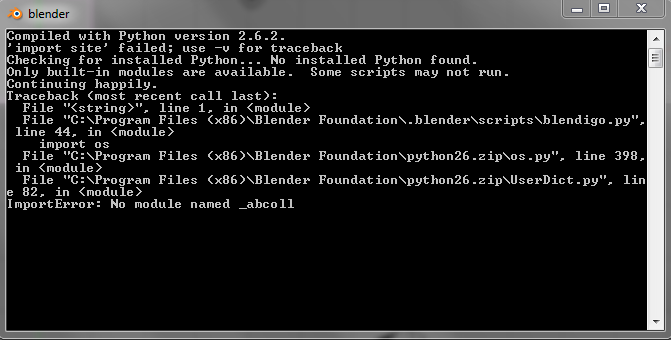
Here my problem
I just install win7, I install last blender and python, last indigo 2.0.10 and las t blendigo 2.0.9.
I've a script error when I launch blendigo
-
Attachments
-
- Capture.PNG (32.39 KiB) Viewed 4901 times
-
WytRaven
- Posts: 905
- Joined: Mon Aug 27, 2007 8:24 pm
- Location: Dubbo, Australia
-
Contact:
Post
by WytRaven » Sun Jul 19, 2009 2:24 pm
3rd line: "Checking for installed Python... No installed Python found"
"A foolish consistency is the hobgoblin of little minds..." - Emerson 1841
-
Jambert
- Posts: 545
- Joined: Wed Jul 30, 2008 10:08 pm
- Location: France, Lyon
Post
by Jambert » Mon Jul 20, 2009 3:24 am
Sorry
Thx
-
And1Legend21
- Posts: 11
- Joined: Fri Jan 09, 2009 4:44 pm
Post
by And1Legend21 » Mon Jul 20, 2009 9:14 am
I am have everything installed correctly.. I think lol anyway. Everything is working fine except the preview of a material. It will work if I just boot up blender and then press preview in blendigo but if I want to preview a material with a image on it like a uv set it doesn't work. It says so such set on the object sphere. Do i need to change the uv set to "uv" or is there way to change everything so I can use the uv set of "UVTex" <- i think i said that right.

-
Borgleader
- Posts: 2149
- Joined: Mon Jun 16, 2008 10:48 am
Post
by Borgleader » Mon Jul 20, 2009 9:45 am
it means your UV set names dont match. look at the name in blender and paste it in blendigo.
also next time please remove the white part of the image...its stretching the page.
benn hired a mercenary to kill my sig...
Who is online
Users browsing this forum: No registered users and 19 guests


