

PT or MLT? MLE is usually a better choice for interiors..neo0. wrote:Over 15,000 spp and it's still noisy..
Simple Renderings Thread
-
pixie


- Posts: 2345
- Joined: Sat Dec 29, 2007 4:54 am
- Location: Away from paradise
- 3D Software: Cinema 4D
- Contact:
Re: Simple Renderings Thread
Re: Simple Renderings Thread
Plain path tracing. I heard PT was better for direct lighting..
-
pixie
- Posts: 2345
- Joined: Sat Dec 29, 2007 4:54 am
- Location: Away from paradise
- 3D Software: Cinema 4D
- Contact:
Re: Simple Renderings Thread
It's quite hard to loose the grainy look in interiors, from my experience at least I rather prefer MLTneo0. wrote:Plain path tracing. I heard PT was better for direct lighting..
Re:
I realized I am replying to an ancient posting... but I'm trying a similar test render (light inside of a glass container) and while the rest of the scene has cleared, I have little dots all over the edges of the glass container, after 12 hours of rendering. I'm going to cook it a while longer today to see if it clears but this looks similar to the same problem I had in luxrender - light behind glass takes forever, or seemingly forever, to clear. Is this a limitation of the MLT BDir method? Could some kind of "hinting" added to a material alert the renderer to this kind of situation so it can be avoided?BbB wrote:My 2 cents
-
PowStudios

- Posts: 62
- Joined: Tue Mar 16, 2010 5:21 am
- Location: Hessia
Re: Re:
Hi,forgeflow wrote:I realized I am replying to an ancient posting... but I'm trying a similar test render (light inside of a glass container) and while the rest of the scene has cleared, I have little dots all over the edges of the glass container, after 12 hours of rendering. I'm going to cook it a while longer today to see if it clears but this looks similar to the same problem I had in luxrender - light behind glass takes forever, or seemingly forever, to clear. Is this a limitation of the MLT BDir method? Could some kind of "hinting" added to a material alert the renderer to this kind of situation so it can be avoided?BbB wrote:My 2 cents
I don't want to steal your question, so I propagate it and add some FunnyFerns.
Pow
- Attachments
-
- Funny Ferns
- FunnyFerns2_745spp.jpg (118.38 KiB) Viewed 5756 times
-
- Funny Ferns
- FunnyFerns4_485spp.jpg (135.09 KiB) Viewed 5755 times
-
- Funny Ferns
- FunnyFerns3_938spp.jpg (153.27 KiB) Viewed 5758 times
MacBook 2.4Ghz, 2GB + i7-920, 6 GB
My MacBook 'whines': http://www.google.com/search?q=macbook+whine
If anyone has a solution that works pls message!
My MacBook 'whines': http://www.google.com/search?q=macbook+whine
If anyone has a solution that works pls message!
-
PowStudios
- Posts: 62
- Joined: Tue Mar 16, 2010 5:21 am
- Location: Hessia
Re: Simple Renderings Thread
One little addition, because the lamp is so decently exposed. Unfortunately some grain (at the silver bottom and on the pinos above) get's more.
Pow
Pow
- Attachments
-
- Funny Pinos 2
- FunnyPinos2_3428spp.jpg (102.08 KiB) Viewed 5790 times
MacBook 2.4Ghz, 2GB + i7-920, 6 GB
My MacBook 'whines': http://www.google.com/search?q=macbook+whine
If anyone has a solution that works pls message!
My MacBook 'whines': http://www.google.com/search?q=macbook+whine
If anyone has a solution that works pls message!
Re: Simple Renderings Thread
Hi Pibuz!Pibuz wrote:Ok Jeff: share your secrets.
I admit I downloaded some of your trees from the warehouse but was totally unable to use them in a render. Something is wrong with the scene and it can't render even at a ridiculous resolution....
I can't be doing something wrong: I just click "render"

Most of the models I uploaded to the warehouse can be rendered but only a few can be made into instances.
I was not yet able to test all of them and at the moment can only say that the following models can be made into instances.
http://sketchup.google.com/3dwarehouse/ ... revstart=0
http://sketchup.google.com/3dwarehouse/ ... revstart=0
http://sketchup.google.com/3dwarehouse/ ... revstart=0
Some tips in order to have different leaf color for the trees in a scene:
1. Copy the tree model you want to have a different color.
2. Open a new Sketchup file and paste the model you copied.
3. Change the color of the leaf in the materials.
4. Rename the model.
5. Modify the leaf component. Scale it up or down slightly so it wont have the same size as the original leaf.
6. Copy the modified tree and paste it back to the scene.
Hope this helps! Cheers!


Re: Simple Renderings Thread
OHHHH! Thank you very much!
Can you explain why other trees can't be instanced? Some inner component's conflict or something similar?
Can you explain why other trees can't be instanced? Some inner component's conflict or something similar?
Re: Simple Renderings Thread
An early render of something I am working on. Materials tommorow! Decided to redeo my space apartment scene. It's a t shaped structure, with the living room at the front and the bedroom/ktichen on the two sides.
- Attachments
-
- to see her smile again i do.jpg (180.54 KiB) Viewed 5464 times
Re: Simple Renderings Thread
If you can add some greebles or the outside guts of spaceships like ducts and pipe networks on the interior, it might resemble a scene like those in the movies.
Re: Simple Renderings Thread
The models that cannot be instanced have more detail or have much higher polys. I think all the models can actually be instanced if a more powerful computer is used.Pibuz wrote:OHHHH! Thank you very much!
Can you explain why other trees can't be instanced? Some inner component's conflict or something similar?
Re: Simple Renderings Thread
...I know that's not SO up-to-date, but I suppose that my q6600 with 4GB RAM is sufficient to render an 800x600 image! 
Moreover, instancing is made to SAVE memory, so I really can't see the point why I can't render a scene with two single lonely trees floating in the infinite sky.
Moreover, instancing is made to SAVE memory, so I really can't see the point why I can't render a scene with two single lonely trees floating in the infinite sky.
-
PureSpider

- Posts: 1459
- Joined: Tue Apr 08, 2008 9:37 am
- Location: Karlsruhe, BW, Germany
- Contact:
Re: Simple Renderings Thread
Hey neo0., I think you're going to the right direction finally!
Now please don't mess up the materials, just ask for help if you need some.
Now please don't mess up the materials, just ask for help if you need some.
Re: Simple Renderings Thread
Yep, im on break right now which gives me alot of time to model. Before, life was hectics and I didn't have much time to think about modelling.
Re: Simple Renderings Thread
I suppose you must be using this model for that scene:Pibuz wrote:...I know that's not SO up-to-date, but I suppose that my q6600 with 4GB RAM is sufficient to render an 800x600 image!
Moreover, instancing is made to SAVE memory, so I really can't see the point why I can't render a scene with two single lonely trees floating in the infinite sky.
http://sketchup.google.com/3dwarehouse/ ... 85bf4b20a6
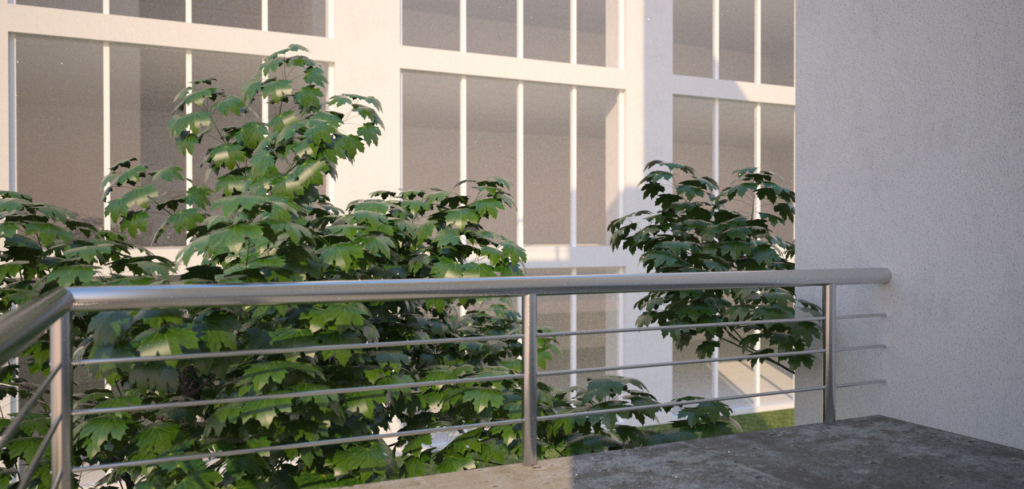
I myself find it very difficult to use. Initially all the models I am planning to make would be similarly built but after finding out what this kind of model is capable of doing, I just abandoned the idea and reverted back to the typical sketchup tree. The first render below should have two of those trees but since it can't render, I resorted to moving some of the tree branches to the right to give the impression that there is another one behind the wall. On the 2nd image, I removed the leaf image on the leaves and I was able to render more than one. All these were rendered using Indigo 1.09.

Who is online
Users browsing this forum: No registered users and 58 guests