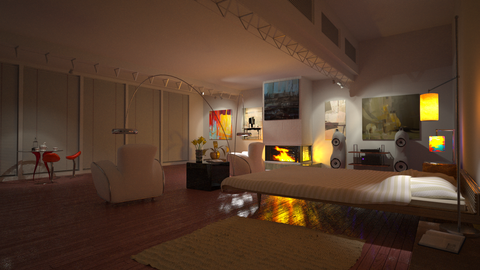
bedroom interior

Get feedback from others on your works in progress
User avatar
Pibuz
1st Place 100
Posts: 2646
Joined: Tue Dec 11, 2007 7:58 am
Location: Padua, Italy
3D Software: SketchUp

Post by Pibuz » Fri Feb 22, 2008 9:04 am

That's an interesting one!

+1 Roger about the fire: a little unrealistic (but it still feels right). I must say i like your bed, but your red-legged table is the best :wink:

It should be a render subject itself!!

GREAT WORK!

pxl666
Posts: 308
Joined: Wed Oct 10, 2007 10:10 pm

Post by pxl666 » Sat Feb 23, 2008 8:39 am

aaaargh

finally decided to give it up...noise wont go away so i tried to denoise it - with no satisfying results...
heres the original ver
Image

and exr tonemapped in ps cs3 + median filter (1pix radius)
Image

im also posting settings for nightshot - tell me if they can be tweaked to get this rendered much quicker

oh yes - and the bottom of yellow lampshade is still black - this is the issue with transparent diffurse matt
Attachments
bedroom_nite_tonemapped_sett.jpg
niteshot settings
bedroom_nite_tonemapped_sett.jpg (29.9 KiB) Viewed 2928 times

User avatar
Kram1032
Posts: 6649
Joined: Tue Jan 23, 2007 3:55 am
Location: Austria near Vienna

Post by Kram1032 » Sat Feb 23, 2008 12:32 pm

basically, to make shots faster, add more light xD (so that Indigo doesn't have to render so much indirect light, relative to the direct one)

would be interesting if you'd add something like moonlight :) (although the jalousies have to be open, then...)

pxl666
Posts: 308
Joined: Wed Oct 10, 2007 10:10 pm

Post by pxl666 » Sat Feb 23, 2008 12:38 pm

Kram1032 wrote: would be interesting if you'd add something like moonlight :) (although the jalousies have to be open, then...)
thx kram - honestly - i've been talkin' bout this with my 3dfriend...and ..yes...i'll try maybe tomorrow - idea is growing already in my head

pxl666
Posts: 308
Joined: Wed Oct 10, 2007 10:10 pm

Post by pxl666 » Mon Feb 25, 2008 6:58 am

Pibuz wrote:That's an interesting one!

+1 Roger about the fire: a little unrealistic (but it still feels right). I must say i like your bed, but your red-legged table is the best :wink:

It should be a render subject itself!!

GREAT WORK!
voila! lets sit and have some coffee my friends! im not sure what gone wrong with flat surface...is it an issue with geomtery? - screen attached below

rendertime: 30hrs on two dualcores 2ghz xp64 (scene crashes on xp32 which is a big issue for me since my third slavemachine cannot be converted to xp64...)
Attachments
cofeetime_tablewire.jpg
cofeetime_tablewire.jpg (102.45 KiB) Viewed 2853 times
cofeetime.jpg
cofeetime.jpg (214.28 KiB) Viewed 2864 times

User avatar
psor
1st Place Winner
Posts: 1295
Joined: Sun Jun 25, 2006 1:25 am
Location: Berlin
Contact:

Post by psor » Mon Feb 25, 2008 11:21 am

I love the close up! Great work mate! :D :D ;)

*KEEP IT UP*

nb: I dunno about the "distortion" in your plate, but I would say it's about
your geometry. The easiest way would be to redo the plate without subD
modifier to have a better topology. I guess you're on blender and I guess
there is no "relax" modifier to relax the geometry to make it more straight.


take care
psor
"The sleeper must awaken"

User avatar
OnoSendai
Developer
Posts: 6243
Joined: Sat May 20, 2006 6:16 pm
Location: Wellington, NZ
Contact:

Post by OnoSendai » Mon Feb 25, 2008 11:10 pm

Last image is great!

User avatar
Zom-B
1st Place 100
Posts: 4701
Joined: Tue Jul 04, 2006 4:18 pm
Location: ´'`\_(ò_Ó)_/´'`
Contact:

Post by Zom-B » Tue Feb 26, 2008 2:13 am

OnoSendai wrote:Last image is great!
yes, its realy nice!
But the red seat material seems to suffer from this bug.
polygonmanufaktur.de

BbB
Posts: 1996
Joined: Fri Feb 09, 2007 8:28 am
Location: Berlin
Contact:

Post by BbB » Tue Feb 26, 2008 2:51 am

Yes. very nice light in this one.

Re Zomb's comment: I've noticed this problem with Phongs in recent instalments of Indigo. Did something get broken at some stage?

User avatar
Kram1032
Posts: 6649
Joined: Tue Jan 23, 2007 3:55 am
Location: Austria near Vienna

Post by Kram1032 » Tue Feb 26, 2008 2:54 am

If you apply the subd modifier, you can select every loop (they wont be "loopy" enough, to select them with loop selection, under circumstances), but your cursor in the middle of the selected circle and spherify it ;)
(you'll have to do that with every single loop, as else, you'll get a sphere...)

Looks very nice :) I actually kinda like the distortion ;)

Oh, one more:
you also can delete inner loops: they shouldn't be needed... (there should be just one loop, which stops the tris in the middle from hitting the edge of the outer frame. there should be a ring of quads, in between...)

User avatar
Pibuz
1st Place 100
Posts: 2646
Joined: Tue Dec 11, 2007 7:58 am
Location: Padua, Italy
3D Software: SketchUp

Post by Pibuz » Tue Feb 26, 2008 4:03 am

..YEAH 8)

pxl666
Posts: 308
Joined: Wed Oct 10, 2007 10:10 pm

Post by pxl666 » Tue Feb 26, 2008 4:28 am

but this http://images23.fotosik.pl/162/dce8e3e91c343676.jpg is what i still cannot go around...[/url]

User avatar
Kram1032
Posts: 6649
Joined: Tue Jan 23, 2007 3:55 am
Location: Austria near Vienna

Post by Kram1032 » Tue Feb 26, 2008 4:34 am

stronger subD?

pxl666
Posts: 308
Joined: Wed Oct 10, 2007 10:10 pm

Post by pxl666 » Tue Feb 26, 2008 4:43 am

Kram1032 wrote:stronger subD?
is this geometry-related? i thought flat cube of transparent diffuse should be transparent from both sides...im cooking another view on my bedroom - after that i will test some issues with transparent diffuse...or maybe there are tests already??

User avatar
Kram1032
Posts: 6649
Joined: Tue Jan 23, 2007 3:55 am
Location: Austria near Vienna

Post by Kram1032 » Tue Feb 26, 2008 4:56 am

oh...
I'm a bit confused, now
What's the problem? xD

Post Reply
36 posts

Who is online

Users browsing this forum: No registered users and 39 guests