Get feedback from others on your works in progress
-
Doug Armand

- Posts: 1038
- Joined: Fri May 16, 2008 5:49 pm
- Location: London UK
Post
by Doug Armand » Fri Feb 26, 2010 7:36 am
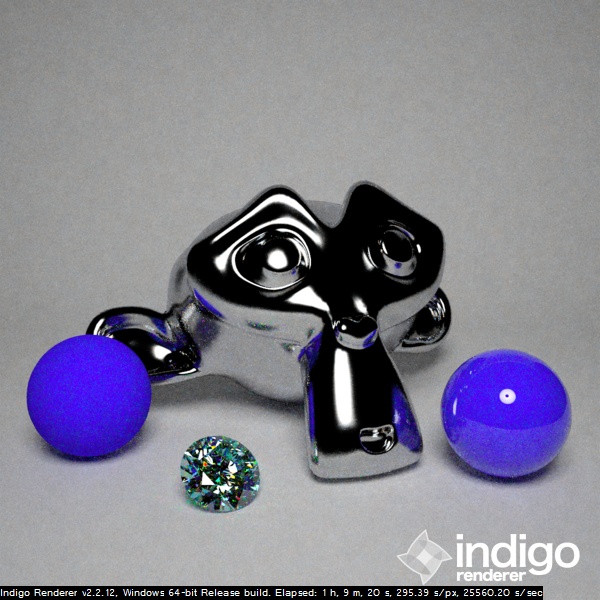
Managed to fit in some time so here are the renders - pretty much what was shown in first post but at least these tie in with the posted .blend file
Softbox
great for product shots - nice soft shadows/lighting

- SoftboxBlender.jpg (125.26 KiB) Viewed 14026 times
Brolly Reflector
Good for portraits
- BrollyreflectorBlender.jpg (131.15 KiB) Viewed 14032 times
2x Brolly Reflectors
Twice as good for portraits?


- 2xBrollyreflectorBlender.jpg (122.89 KiB) Viewed 14029 times
Ringlight
Great for copy work - notice harder shadows - also used a lot in fashion photography - gives interesting dead-on portraits. Also gives characteristic doughnut light reflections

- RinglightBlender.jpg (107.77 KiB) Viewed 14030 times
Doug
Doug Armand
-
Doug Armand
- Posts: 1038
- Joined: Fri May 16, 2008 5:49 pm
- Location: London UK
Post
by Doug Armand » Fri Feb 26, 2010 7:48 am
BTW if anyone can convert the blender file I posted into another 3d package format, and having made sure all the materials, etc work, I would be more than happy to host them on my Windows Live skydrive space so others can download them
Doug
Doug Armand
-
Soup
- Posts: 444
- Joined: Sat Jun 13, 2009 1:20 am
Post
by Soup » Fri Feb 26, 2010 11:05 am
Hey Doug I'm getting an error with that blend file, I just updated to 2.49b too and still getting it. Could you re-upload it?
-
dmn

- Posts: 243
- Joined: Thu Dec 21, 2006 6:42 pm
Post
by dmn » Fri Feb 26, 2010 11:17 am
<homergurgle> doe..nut light reflections... :d </homergurgle>
-
dmn
- Posts: 243
- Joined: Thu Dec 21, 2006 6:42 pm
Post
by dmn » Fri Feb 26, 2010 1:55 pm
-
Attachments
-

- im1267147883.png (445.77 KiB) Viewed 13964 times
-
Doug Armand
- Posts: 1038
- Joined: Fri May 16, 2008 5:49 pm
- Location: London UK
Post
by Doug Armand » Fri Feb 26, 2010 4:53 pm
Soup wrote:Hey Doug I'm getting an error with that blend file, I just updated to 2.49b too and still getting it. Could you re-upload it?
DMN seems to have it working, see his post with an image done in sktechup, what errors are you getting?
Doug
Doug Armand
-
Doug Armand
- Posts: 1038
- Joined: Fri May 16, 2008 5:49 pm
- Location: London UK
Post
by Doug Armand » Fri Feb 26, 2010 4:53 pm
Hey nice one! that test scene is better than mine!
ringlight version?
Doug
Doug Armand
-
Whaat

- Posts: 1827
- Joined: Fri Dec 22, 2006 6:15 am
- Location: Canada
-
Contact:
Post
by Whaat » Sat Feb 27, 2010 2:27 am
Thanks Doug! and thanks dmn for posting the SKP version!
-
wojtek-w
- Posts: 106
- Joined: Fri Nov 06, 2009 5:21 am
- Location: Poland
-
Contact:
Post
by wojtek-w » Sat Feb 27, 2010 5:02 am
thank You very much. Although one linked material has absolute path and it gives error message. Of course it doesn't really metter (it's only for the record) and this file is veeery useful.
Thanks Doug for sharing
-
Doug Armand
- Posts: 1038
- Joined: Fri May 16, 2008 5:49 pm
- Location: London UK
Post
by Doug Armand » Sun Feb 28, 2010 1:56 am
OK Im starting to try and make a tutorial on how to model/use all this stuff. Here is my first attempt at it and it's in a .pdf format - please be gentle
This is just a taster to see if there is a demand to warrant the effort for this and also if the style I use is acceptable - I use an awful lot of next, now, and first words etc

It's a simple how to - ie to how create a Studio light with Brolly Reflector, and it is very Blender orientated but the concepts should still be useable most 3D users.
I was also intending to also show how to use Blendigo to set up the materials and also how to set up a basic studio shot. If there is demand then I will also show how to do the softbox and ringlights etc
Anyway here its is:
Doug
Doug Armand
-
dmn
- Posts: 243
- Joined: Thu Dec 21, 2006 6:42 pm
Post
by dmn » Mon Mar 01, 2010 3:22 pm
Doug Armand wrote:
Hey nice one! that test scene is better than mine!
ringlight version?
Yes, ring light. But I have each light group you set up on a separate layer so it should work. Not sure about the absolute path thing. Skindigo is a little less transparent than Blendigo (not to say that either is better than the other ). This is a great reference for how to set these kind of lights up.
-
Soup
- Posts: 444
- Joined: Sat Jun 13, 2009 1:20 am
Post
by Soup » Mon Mar 01, 2010 3:36 pm
Doug Armand wrote:Soup wrote:Hey Doug I'm getting an error with that blend file, I just updated to 2.49b too and still getting it. Could you re-upload it?
DMN seems to have it working, see his post with an image done in sktechup, what errors are you getting?
Oh dw, the skydrive URL tricked me
Btw looks good, both versions! Could we get a maxigo version perchance? I rekon Fused could whip up a C4d one real quick too.

-
mr_jo
- Posts: 29
- Joined: Wed Jan 23, 2008 9:36 am
- Location: Caserta (Italy)
Post
by mr_jo » Sat Mar 06, 2010 8:51 pm
Thanks Doug and dmn for the scene;
This is my SkIndigo try with another rectangular emitter on the right.
I've dimmed the gain of the ringligth layer to 0.15 so the most light goes from the right.

-
Doug Armand
- Posts: 1038
- Joined: Fri May 16, 2008 5:49 pm
- Location: London UK
Post
by Doug Armand » Sat Mar 06, 2010 11:10 pm
mr_jo wrote:Thanks Doug and dmn for the scene;
This is my SkIndigo try with another rectangular emitter on the right.
I've dimmed the gain of the ringligth layer to 0.15 so the most light goes from the right.
My pleasure

Thats really nice - interesting shadows
Doug
Doug Armand
-
garry15
- Posts: 1
- Joined: Tue May 04, 2010 8:14 pm
-
Contact:
Post
by garry15 » Tue May 04, 2010 8:27 pm
Great Studio Lighting Test. I really enjoy it
Studio Lighting Kits
[url]http://www.photostudiosupplies.com[/url]
Who is online
Users browsing this forum: No registered users and 59 guests


