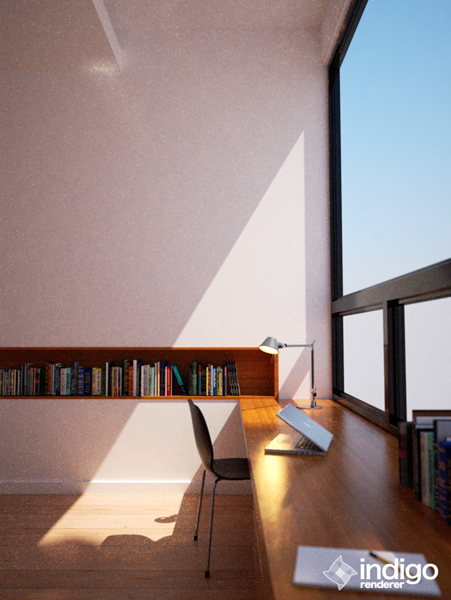
Dots & dots...

Come here for help & support.
User avatar
hcpiter
1st Place Winner
Posts: 242
Joined: Fri Feb 19, 2010 9:19 am
Location: Poland
Contact:

Dots & dots...

Post by hcpiter » Thu Feb 25, 2010 5:22 am

hello !
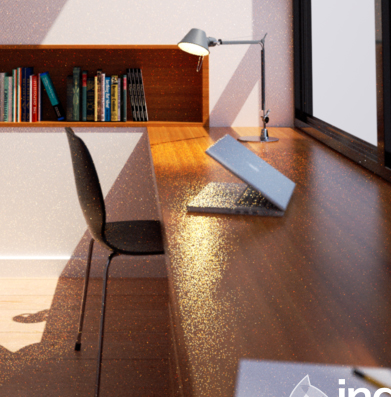
Ive got problem in indigo with material. how I can reduce all dots and why Ive got in render that sh** ?:)
I tryed add more subdvs for material but doesent work and still Ive god dots especialy in refl and gloss materials
Render time about 3 and 4 hours, strange because in other scenes faster is no noisy :/

Example in renders. I use 3ds max, light spot as sun.
1st with dof, 2nd without.

Image Image

Thanks
Piotr

User avatar
Whaat
Developer
Posts: 1827
Joined: Fri Dec 22, 2006 6:15 am
Location: Canada
Contact:

Re: Dots & dots...

Post by Whaat » Thu Feb 25, 2010 6:31 am

Try using Bidirectional MLT render method.

User avatar
Zom-B
1st Place 100
Posts: 4701
Joined: Tue Jul 04, 2006 4:18 pm
Location: ´'`\_(ò_Ó)_/´'`
Contact:

Re: Dots & dots...

Post by Zom-B » Thu Feb 25, 2010 7:48 am

this may also be related by using Light Layers.

Each light get more calculation related to the lux value. A light-source with 100 times more lux gets 100 times more samples calculated then the other... it has a 100 times higher priority!
polygonmanufaktur.de

User avatar
lycium
Posts: 1216
Joined: Wed Sep 12, 2007 7:46 am
Location: Leipzig, Germany
Contact:

Re: Dots & dots...

Post by lycium » Thu Feb 25, 2010 10:23 am

Two possibilities spring to mind:

* Light layers as Zom-B mentioned; light sources are sampled proportionally to their power, but you effectively change that with the light layer scale factor. So basically, light layers are to improve workflow only - once you have found a good light balance, apply those factors to your brightness in the actual scene before kicking off a long render :)

* Glass in front of the light source - this makes the light transport more difficult to sample with the unbiased path tracing methods that Indigo uses.

User avatar
hcpiter
1st Place Winner
Posts: 242
Joined: Fri Feb 19, 2010 9:19 am
Location: Poland
Contact:

Re: Dots & dots...

Post by hcpiter » Fri Feb 26, 2010 12:58 am

Thanks for help !:)

Bidirectional MLT render method just blurred render and reflection, but not fix.

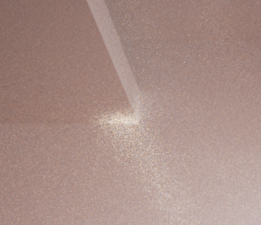
Problem was because in lamp emitter was too high or something wrong because when I change parameter of power or delete lamp works fine (without dots), BUT Ive got another problem and I think problem is with sun&sky. In the corner is a lot of dots and when render time is longer is more dosts(geometry in this part of scene is ok). I change lighting in scene as background and delete sun was fine. How fix that ?
Here example:
Image

Thanks
Piotr

User avatar
suvakas
3rd Place Winner
Posts: 2613
Joined: Mon Sep 04, 2006 11:08 pm
Location: Estonia
Contact:

Re: Dots & dots...

Post by suvakas » Fri Feb 26, 2010 2:34 am

For how long are you rendering your images and to how many samples per pixel ?
Also are you using pure white tones?

I agree with Whaat though, that MLT is usually better for interior images with a lot of indirect lighting.

User avatar
hcpiter
1st Place Winner
Posts: 242
Joined: Fri Feb 19, 2010 9:19 am
Location: Poland
Contact:

Re: Dots & dots...

Post by hcpiter » Fri Feb 26, 2010 3:20 am

Render time is about 2.30H but if is longer is more dots.
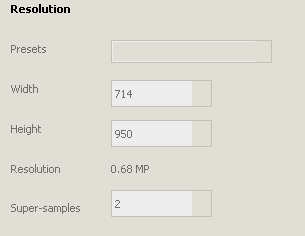
I dont know where I can check how many samples per pixel Ive got in scene. SPP mean super sample ?
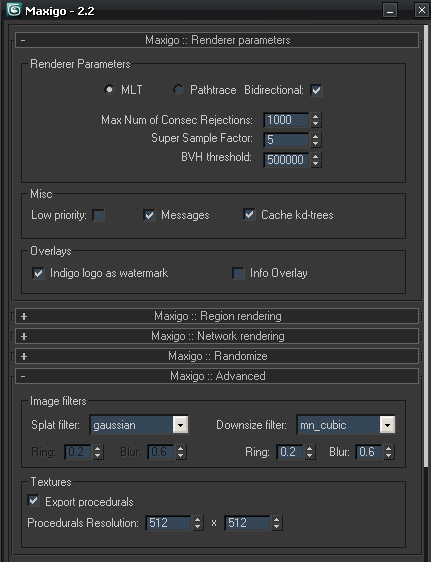
Screen from settings:

Image

Here render with MLT method and doesn`t work. :/
Image

Thanks
Piotr

User avatar
pixie
Indigo 100
Posts: 2346
Joined: Sat Dec 29, 2007 4:54 am
Location: Away from paradise
3D Software: Cinema 4D
Contact:

Re: Dots & dots...

Post by pixie » Fri Feb 26, 2010 4:37 am

hcpiter wrote:Render time is about 2.30H but if is longer is more dots.
I dont know where I can check how many samples per pixel Ive got in scene. SPP mean super sample ?
Screen from settings:

Image

Here render with MLT method and doesn`t work. :/
Image

Thanks
Piotr
I would say it's quite better... which computer are you using for the renders?

User avatar
hcpiter
1st Place Winner
Posts: 242
Joined: Fri Feb 19, 2010 9:19 am
Location: Poland
Contact:

Re: Dots & dots...

Post by hcpiter » Fri Feb 26, 2010 4:46 am

My white wall is RGB 250
pixie- my CPU quad core around 4Ghz, 8G memory DDR2 800mhz
It`s not quite better with MTL because is just blurred and Ive still got white dots in corner and this the biggest problem.

User avatar
fenerolina
Posts: 141
Joined: Sun Mar 15, 2009 12:27 pm
Location: Pyrenees

Re: Dots & dots...

Post by fenerolina » Fri Feb 26, 2010 4:56 am

Hi hcpiter.
I'm not sure but I think the white dots in the corner of the ceiling are the reflection of the bottom of lamp on the table. This kind of reflections are more slow to converge but looks very good when they are clean. And yes, the image seems to be more out of focus.
Let me show you a similar reflection I think:
Attachments
corbusier12.png
corbusier12.png (472.67 KiB) Viewed 6774 times

User avatar
Zom-B
1st Place 100
Posts: 4701
Joined: Tue Jul 04, 2006 4:18 pm
Location: ´'`\_(ò_Ó)_/´'`
Contact:

Re: Dots & dots...

Post by Zom-B » Fri Feb 26, 2010 5:27 am

hcpiter wrote:I dont know where I can check how many samples per pixel Ive got in scene. SPP mean super sample ?
SPP = Samples Per Pixel
hcpiter wrote:My white wall is RGB 250
Use a max of 80% white for your scenes (also for colored materials max of 80% saturation in RGB! => 205)
with your super high white value light reflects nearly always from the walls and such dots like you have can appear! 80% is also more real life scenario ;-)
hcpiter wrote:It`s not quite better with MTL because is just blurred and Ive still got white dots in corner and this the biggest problem.
MLT + BiDir should be the way to go for scenes with caustics, glass etc.
In My workflow I use it always!
polygonmanufaktur.de

User avatar
Whaat
Developer
Posts: 1827
Joined: Fri Dec 22, 2006 6:15 am
Location: Canada
Contact:

Re: Dots & dots...

Post by Whaat » Fri Feb 26, 2010 9:31 am

hcpiter wrote:My white wall is RGB 250
pixie- my CPU quad core around 4Ghz, 8G memory DDR2 800mhz
It`s not quite better with MTL because is just blurred and Ive still got white dots in corner and this the biggest problem.
hmm....are you sure the bluriness isn't caused by aperture diffraction? Are you sure that it is turned off for the MLT render??

I'm also curious to what your MNCR settings is (max num consecutive rejections). Try lowering it to 500. This should reduce the dots although you might lose some caustic effects. 1000 is usually a good value but might result in more fireflies for complicated scenes. Higher values than 1000 are rarely required unless you want the most obscure caustics and light paths to show up. Convergence time can really increase though.

User avatar
hcpiter
1st Place Winner
Posts: 242
Joined: Fri Feb 19, 2010 9:19 am
Location: Poland
Contact:

Re: Dots & dots...

Post by hcpiter » Fri Feb 26, 2010 10:52 am

Hello all ! :)
Thanks very much for help. Now I`m rendering version without sun and is fine, standart settings but I change just super samples factory to 6
About MTL I read in manual and you right this is good method but here doesn`t work and I dont know why :/
I think fenerolina got right and this is something from reflect like caustic etc ? But one thing is strange, why if render time is longer, scene is not noisy but is more dots around render and not just in this place :/
I change wall to RGB 205 and nothing :/

Whaat diffraction is turn off all time. here my settings:
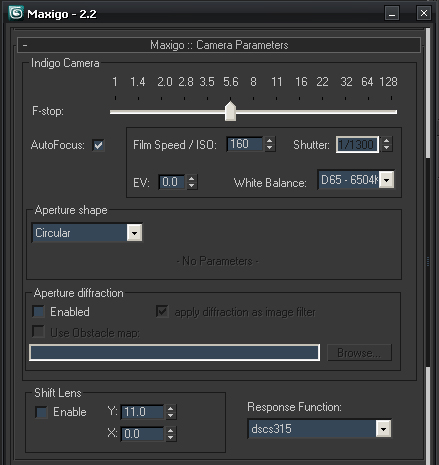
Image

Image

Tomorrow I start new render with your settings and maybe will be good, because this is my nightmare :D Today I spend all day for testing all settings. I change emitters, positions of sun and etc and nothing :p
I must fix that :D

Thanks
Piotr

User avatar
Zom-B
1st Place 100
Posts: 4701
Joined: Tue Jul 04, 2006 4:18 pm
Location: ´'`\_(ò_Ó)_/´'`
Contact:

Re: Dots & dots...

Post by Zom-B » Fri Feb 26, 2010 11:59 am

hcpiter wrote:... I change just super samples factory to 6...
This is quite high m8 :lol:

if your image is 512x512 pixels supersampling @ 6 renders internally with 3072x3072 an the scales down the result back to 512x512.

This method is to prevent Aliasing! If your resize filter is Gaussian or even a MN with high Blur value this might result in a blurry image.

For the sharpest result use Mitchel Netravali with Ring 0.5 and Blur 0 (may keep noise long time visible)
a good overall value is MN with ring & blur @ 0.333.

Maybe you can cut down your scene to a minimum and post it, so we can play around with it :) (at least the maxigo guys)
polygonmanufaktur.de

User avatar
hcpiter
1st Place Winner
Posts: 242
Joined: Fri Feb 19, 2010 9:19 am
Location: Poland
Contact:

Re: Dots & dots...

Post by hcpiter » Fri Feb 26, 2010 9:38 pm

hello !:D

Ohh, Yess, yes yes ! Its working now :D I change to Bidirectional MLT render method but I change MNCR settings from 1000 to 10 and white dots gone :D Thanks, very, very much for help all peoples from this topic :)

Thanks
Piotr

Post Reply
21 posts

Who is online

Users browsing this forum: No registered users and 7 guests