General questions about Indigo, the scene format, rendering etc...
-
dougal2

- Posts: 2532
- Joined: Wed Nov 15, 2006 8:17 am
- Location: South London
Post
by dougal2 » Thu Nov 29, 2007 12:11 am
-
Phr0stByte
- Posts: 395
- Joined: Wed Nov 22, 2006 5:07 am
- Location: Centreville, VA
-
Contact:
Post
by Phr0stByte » Thu Nov 29, 2007 12:54 am
Now that would be awesome!
-
CTZn
- Posts: 7240
- Joined: Thu Nov 16, 2006 4:34 pm
- Location: Paris, France
Post
by CTZn » Thu Nov 29, 2007 4:58 am
Hehe, in fact I set up this recording rig with Maya in mind, so it's likely to happen

I'm using camstudio 2.5 and ffdshow codec suite, both free. The video is processed (reduced) in the fly, the final product is ready when I stop recording !
obsolete asset
-
dougal2
- Posts: 2532
- Joined: Wed Nov 15, 2006 8:17 am
- Location: South London
Post
by dougal2 » Thu Nov 29, 2007 5:00 am
CTZn wrote:I'm using camstudio 2.5 and ffdshow codec suite, both free. The video is processed (reduced) in the fly, the final product is ready when I stop recording !
Cool, now I know how you did it, I might to a couple as well

Might be so much easier than actually having to
write the documentation... but then again, maybe not.
-
CTZn
- Posts: 7240
- Joined: Thu Nov 16, 2006 4:34 pm
- Location: Paris, France
Post
by CTZn » Thu Nov 29, 2007 5:05 am
Yes would be usefull at some point anyway. I'll help you set that up if you need, for instance if you set certain parameters for ffds then the suite will not show anymore in camstudio 2.5, you'll have to call builtin settings again from another app where you can access the codec.
Let's stop squatting wedge's thread !
obsolete asset
-
Wedge
- Posts: 441
- Joined: Sun Jan 14, 2007 11:33 am
- Location: East Coast, USA
Post
by Wedge » Thu Nov 29, 2007 4:55 pm
Hi CTZn, thanks for testing. I fixed the specular bug but did not see your video and do not know what you mean with the phong material.
I checked phong, blend, and bump items and it looks ok. While checking phong material there was a problem with using NK files. Fixed this issue.
Maybe you can rephrase the problem? Thanks for the updates. Posted version 0.73.
Content contained in my posts is for informational purposes only and is used at your own risk.
-
CTZn
- Posts: 7240
- Joined: Thu Nov 16, 2006 4:34 pm
- Location: Paris, France
Post
by CTZn » Fri Nov 30, 2007 5:30 am
Maybe you can rephrase the problem?
Sure: I have "set" a phong material with bump, fine.
Then I "changed" to a blend: for that one the checkbox for blend texture was ready and it's text field grayed out, as expected. The checkbox for bump was greyed out, as expected as well, BUT checked and it's field activated. Later the blend material couldn't be saved by Carmine.
I could reproduce the bug, hope that helps.
-
Attachments
-
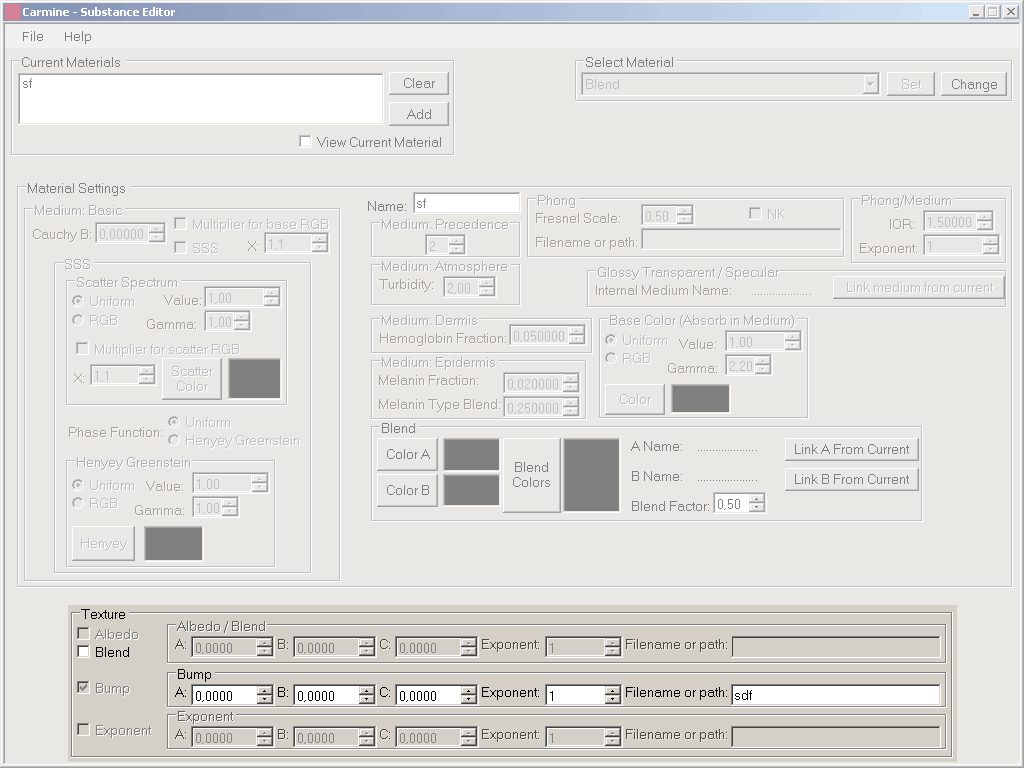
- this is Carmine state after I added the bump mapped phong (sf) and changed/set to blend. Bump was not reinitialized.
- Carmine_phongBlend_bug.gif (38.67 KiB) Viewed 3985 times
obsolete asset
-
Wedge
- Posts: 441
- Joined: Sun Jan 14, 2007 11:33 am
- Location: East Coast, USA
Post
by Wedge » Fri Nov 30, 2007 1:03 pm
Ohhh, I know what that is caused by. It should also do that for Albedo and Exponent if you used them. And also possibly by the other materials that use those textures. Thanks, I'll fix it asap.
I probably cleared the form when testing.
Edit: Posted the update, error was caused by settings that were carried over from the previous material that could not be used by the new material. This caused a number of errors so now when you click the Change button the form will reset itself. I wanted to keep the settings as materials were changed to make it easy for the user but it is not a good idea at this point in time. Too many other problems would have to be corrected.
Content contained in my posts is for informational purposes only and is used at your own risk.
-
CTZn
- Posts: 7240
- Joined: Thu Nov 16, 2006 4:34 pm
- Location: Paris, France
Post
by CTZn » Fri Nov 30, 2007 2:49 pm
Got it
obsolete asset
-
Wedge
- Posts: 441
- Joined: Sun Jan 14, 2007 11:33 am
- Location: East Coast, USA
Post
by Wedge » Mon Dec 03, 2007 7:49 pm
No news is good news.
New update posted. This project is looking good right now, so the releases should slow down. Added keyboard shortcuts, and the font is now a different color so it is easier to see which fields are available to enter data.
Content contained in my posts is for informational purposes only and is used at your own risk.
-
Wedge
- Posts: 441
- Joined: Sun Jan 14, 2007 11:33 am
- Location: East Coast, USA
Post
by Wedge » Wed Jan 16, 2008 10:51 pm
After over a month away from this program and its code....I came back to polish it up.
Now I am going to go hide back over in the Blender forum.

Content contained in my posts is for informational purposes only and is used at your own risk.
-
filippo
- Posts: 658
- Joined: Sat Aug 05, 2006 8:46 pm
- Location: italia(senigallia-an)
-
Contact:
Post
by filippo » Wed Jan 16, 2008 11:35 pm
I have now understood as it works it's very good idea....
filippo
2x Xeon quad core ghz 2.66(8 core)+4g ram+quadro fx
2 x Xeon Quad 5540 (16 core)+16GB ram+ Nvidia GTX 295 1800mb
-
filippo
- Posts: 658
- Joined: Sat Aug 05, 2006 8:46 pm
- Location: italia(senigallia-an)
-
Contact:
Post
by filippo » Wed Jan 16, 2008 11:42 pm
I have now understood as it works it's very good idea....
filippo
2x Xeon quad core ghz 2.66(8 core)+4g ram+quadro fx
2 x Xeon Quad 5540 (16 core)+16GB ram+ Nvidia GTX 295 1800mb
-
Wedge
- Posts: 441
- Joined: Sun Jan 14, 2007 11:33 am
- Location: East Coast, USA
Post
by Wedge » Thu Jan 17, 2008 11:31 am
Updated again to fix an area I broke with the last update. Enjoy!
Edit: Updated again to fix output file formatting.
Content contained in my posts is for informational purposes only and is used at your own risk.
-
Pinko5
- Posts: 497
- Joined: Mon Feb 19, 2007 8:15 pm
- Location: Italy
Post
by Pinko5 » Thu Jan 17, 2008 8:32 pm
Ok tnx Wedge
Luca.
Who is online
Users browsing this forum: Google [Bot] and 46 guests


