Announcements, requests and support regarding SkIndigo - the Sketchup / Indigo exporter.
-
Whaat

- Posts: 1827
- Joined: Fri Dec 22, 2006 6:15 am
- Location: Canada
-
Contact:
Post
by Whaat » Thu Jun 09, 2011 5:52 am
ieatfish wrote:Found my first use for this today. Whaat, you're awesome. It worked great for a small thing but then I tried a few other things and it stopped. The object that should be moving is rendering away from the correct location even though it hasn't moved in the model.
edit: Attached some images. The first is the Sketchup model. Followed your instructions and only rotated the rotors 15 degrees or so. Then when I render...well, you can see what happens. :p
Hi,
I remember testing motion blur on this model a long time ago. i think the problem is that the rotors component axis is not at the center of rotation (make sense?)
First, make sure that the rotor is a component and then try to relocate the axis to the center of the rotor. You will have to reset your keyframes. Let me know if it works.
-
ieatfish
- Posts: 127
- Joined: Sun Jan 31, 2010 5:29 pm
Post
by ieatfish » Sun Jun 12, 2011 7:46 am
Whaat wrote:ieatfish wrote:Found my first use for this today. Whaat, you're awesome. It worked great for a small thing but then I tried a few other things and it stopped. The object that should be moving is rendering away from the correct location even though it hasn't moved in the model.
edit: Attached some images. The first is the Sketchup model. Followed your instructions and only rotated the rotors 15 degrees or so. Then when I render...well, you can see what happens. :p
Hi,
I remember testing motion blur on this model a long time ago. i think the problem is that the rotors component axis is not at the center of rotation (make sense?)
First, make sure that the rotor is a component and then try to relocate the axis to the center of the rotor. You will have to reset your keyframes. Let me know if it works.
Ah, that makes a ton of sense. I'll just assume that's the issue for now and reply if I find anything to the contrary. Thanks!
Intel Core-i7 @ 4.0 GHz | GTX 580 | 12 GB RAM
-
Voytech
- Posts: 236
- Joined: Thu Oct 06, 2011 8:57 am
Post
by Voytech » Fri Feb 03, 2012 12:53 am
Digging up an old thread... Just tried with 3.2.5 and no luck. I can set the key frames fine but there's no instancing anymore so maybe that's the problem? The render comes out with the object at the last key frame and no blur.
-
Whaat
- Posts: 1827
- Joined: Fri Dec 22, 2006 6:15 am
- Location: Canada
-
Contact:
Post
by Whaat » Fri Feb 03, 2012 2:30 am
Voytech wrote:Digging up an old thread... Just tried with 3.2.5 and no luck. I can set the key frames fine but there's no instancing anymore so maybe that's the problem? The render comes out with the object at the last key frame and no blur.
Yes, instancing is automatic in 3.2.5. I will be doing a tutorial on this new method hopefully soon.
In 3.2.5, you need to create a group or component that does not have any nested groups or components within (i.e. explode all nested groups/components)
Then, you should be able to add key frames to this group/comp and will see the correct motion blur when you render.
Give it a try!
-
Voytech
- Posts: 236
- Joined: Thu Oct 06, 2011 8:57 am
Post
by Voytech » Fri Feb 03, 2012 5:14 am
Thanks for the clarification. Will try now.
Ok, all clear here. Thank you again.
-
Attachments
-
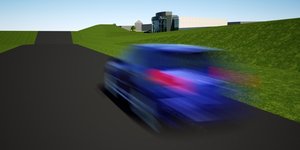
- Blur Test
-
cotty
- Posts: 314
- Joined: Tue Aug 03, 2010 7:59 am
- Location: Germany
-
Contact:
Post
by cotty » Sat Mar 03, 2012 7:28 am
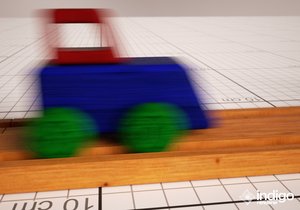
I think there should not be a blurred area in front of the train because it hasn't been there?
-
Attachments
-
little gallery... http://unverzagt.biz/cottysgallery/
-
CTZn
- Posts: 7240
- Joined: Thu Nov 16, 2006 4:34 pm
- Location: Paris, France
Post
by CTZn » Sat Mar 03, 2012 7:34 am
it is exactly there at the end of the frame

On average the
e:occlusion of the background by the vehicle is centered over the whole shot, but during the
time of exposure the object is effectively travelling from one point to the other.
Having blur only at the back end is an artifact coming from comics !
obsolete asset
-
cotty
- Posts: 314
- Joined: Tue Aug 03, 2010 7:59 am
- Location: Germany
-
Contact:
Post
by cotty » Sat Mar 03, 2012 8:05 am
CTZn wrote:it is exactly there at the end of the frame
On average the
e:occlusion of the background by the vehicle is centered over the whole shot, but during the
time of exposure the object is effectively travelling from one point to the other.
Having blur only at the back end is an artifact coming from comics !
Then I have no bad conscience, to show another example...

-
Attachments
-

little gallery... http://unverzagt.biz/cottysgallery/
-
cotty
- Posts: 314
- Joined: Tue Aug 03, 2010 7:59 am
- Location: Germany
-
Contact:
Post
by cotty » Fri Aug 17, 2012 2:05 am
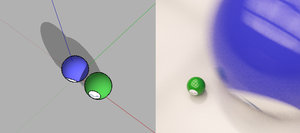
I have noticed the error described
here again and because there is no manual instancing anymore, I am not able to get the right result. Any suggestions?
(I only moved the blue sphere along the red axis without rotation)
-
Attachments
-
little gallery... http://unverzagt.biz/cottysgallery/
-
Whaat
- Posts: 1827
- Joined: Fri Dec 22, 2006 6:15 am
- Location: Canada
-
Contact:
Post
by Whaat » Fri Aug 17, 2012 7:37 am
cotty wrote:I have noticed the error described
here again and because there is no manual instancing anymore, I am not able to get the right result. Any suggestions?
(I only moved the blue sphere along the red axis without rotation)
Hi cotty,
Make sure there are no nested groups or components inside the object that you are applying the motion blur to.
-
cotty
- Posts: 314
- Joined: Tue Aug 03, 2010 7:59 am
- Location: Germany
-
Contact:
Post
by cotty » Fri Aug 17, 2012 8:05 am
Whaat wrote:
Hi cotty,
Make sure there are no nested groups or components inside the object that you are applying the motion blur to.
I think I have followed all the steps from the first post and the spheres are without subgroups...
I have attached the file for testing...
-
Attachments
-
- motiontest.zip
- (148.05 KiB) Downloaded 232 times
little gallery... http://unverzagt.biz/cottysgallery/
Who is online
Users browsing this forum: No registered users and 5 guests


