thanks for the video, it's quite useful to see what you're doing. In fact, the view of your console is quite revealing:
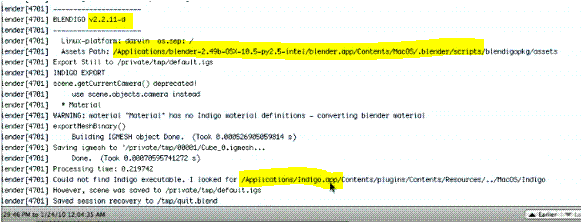
- Capture.GIF (16.96 KiB) Viewed 1241 times
I've highlighted three parts.
The first says "v2.2.11-d" - which tells me that your blender installation is using an old version of Blendigo.
The second is the file path where you will find v2.2.11-d
The third is where Blendigo is looking for Indigo.app. This file path is nonsense. I suspect that at some time you've edited your ~/.indigo/location file.
I suggest we start again with a complete UNinstall, followed by a clean install.
TO UNINSTALL:
- Close all open Blender and Indigo instances (or reboot).
- In Finder, go to /Applications/Utilities
- Run the Terminal application
- Type the following commands, pressing return after each line:
Code: Select all
cd ~/
rm -r .indigo
cd /Applications/blender-2.49b-OSX-10.5-py2.5-intel/blender.app/Contents/MacOS/.blender/scripts
sudo rm blendigo.py
sudo rm -r blendigopkg
With these commands, we are removing the old Blendigo, and the configuration file it uses. We need to use the 'sudo' prefix on some commands because it needs Administrator rights. You will be asked for your password.
TO CLEAN INSTALL:
- Now please
read the actual text in this message:
http://www.indigorenderer.com/forum/vie ... 750#p90750
It tells you where you should place the Indigo and blender application packages.
Your blender application is already in an appropriate place, you don't need to move it.
If there is anything you don't understand about the
requirements, then please ask me before continuing.
- Run the Blendigo installer blendigo-macosx-2.2S.mpkg again.
If you want to video this as you do it, then please also
slow down a little bit so that I can see easily what you are going.
Thanks.


