General questions about Indigo, the scene format, rendering etc...
-
StompinTom

- Posts: 1828
- Joined: Mon Sep 04, 2006 3:33 pm
Post
by StompinTom » Thu Dec 06, 2012 6:16 am
OnoSendai wrote:StompinTom wrote:When using a texture to control coating thickness, the input field could use a couple more decimal places! It's not possible to enter 0.0000001, for example... Perhaps a multiplier?
It's in micrometres, you don't need a value that small

EDIT: Ah, the texture scale (b) control is in metres.
Yeh, that's the one. It also doesn't seem to work properly unless 'Smooth' is enabled, but I'm guessing that'd because an 8-bit image can't really record differences between 0.0000001 and 0.0000002?
Actually, does Indigo manipulate the image (brightness / contrast) and
then grab its values (if you know what I mean)? This could explain a lot of the stepping problems for bumping, because the image values get compressed to such tiny differences that it doesn't matter... Uneducated shot in the dark...
Also, the bump texture on the Substrate doesn't come through...
Last edited by
StompinTom on Thu Dec 06, 2012 6:18 am, edited 1 time in total.
-
CTZn
- Posts: 7240
- Joined: Thu Nov 16, 2006 4:34 pm
- Location: Paris, France
Post
by CTZn » Thu Dec 06, 2012 6:17 am
StompinTom wrote:When using a texture to control coating thickness, the input field could use a couple more decimal places! It's not possible to enter 0.0000001, for example... Perhaps a multiplier?
How about simple textfields in place of those numerical sliders, so any value can be put in, including scientific notation ? "Can't do better with it" is not good enough
edit: I'll add that the up and down arrows as currently are of little help because their increment is arbitrary.
obsolete asset
-
fused

- Posts: 3648
- Joined: Fri Sep 22, 2006 7:19 am
- Location: Berlin, Germany
- 3D Software: Cinema 4D
Post
by fused » Thu Dec 06, 2012 12:24 pm
CTZn wrote:StompinTom wrote:When using a texture to control coating thickness, the input field could use a couple more decimal places! It's not possible to enter 0.0000001, for example... Perhaps a multiplier?
How about simple textfields in place of those numerical sliders, so any value can be put in, including scientific notation ? "Can't do better with it" is not good enough
edit: I'll add that the up and down arrows as currently are of little help because their increment is arbitrary.
The units we added to the parameter contols (in the material editor) were meant to be passed through to the texture control, it just didn't happen (yet). I just added that to the next version.
Nick also made the spin boxes take more decimals and I added some code to trim the trailing zeros
-
Attachments
-
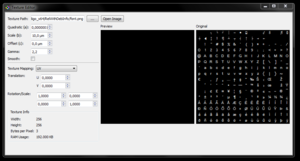
- The texture from the coating parameter
-
CTZn
- Posts: 7240
- Joined: Thu Nov 16, 2006 4:34 pm
- Location: Paris, France
Post
by CTZn » Thu Dec 06, 2012 4:18 pm
Good stuff, thanks guys.
obsolete asset
Who is online
Users browsing this forum: No registered users and 36 guests


