Page 1 of 3
memory allocation failure.
Posted: Tue Mar 31, 2009 10:19 pm
by gerbin
hi! i'm sorry but i haven't found a topic same as what i'm about to say.
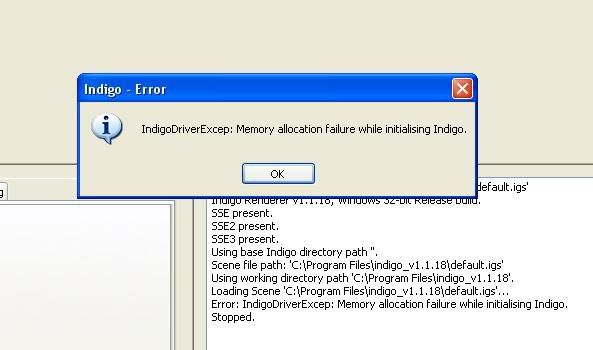
i got this error message---> "Memory allocation failure."
does that mean i don't have enough ram? hehehe. but i did a scene before with much more meshes and materials and stuff but i didn't get such error. Whew.
thanks in advance. i'l ty to include the image tomorrow i'm very sleepy lol.
Posted: Tue Mar 31, 2009 11:54 pm
by SATtva_
It would be helpful if you at least tell us what version of Indigo you're using.
Re: memory allocation failure.
Posted: Wed Apr 01, 2009 12:05 am
by fused
gerbin wrote:does that mean i don't have enough ram?
exactly.
its not the number of meshes or materials that count, its the polygon count and resolution that use much RAM. try to render in a smaller resolution or to reduce some meshes polygon count.
also light layers take a lot of ram. each light layer adds a huge ammount of ram.
(heres a formula to approximate the ram needed for 1 light layer: width*height*32bit*3/8/1024/1024. that means a 1600x1200 layer needs ~22mb ram, please correct me if im wrong ^^)
Posted: Wed Apr 01, 2009 12:56 am
by SATtva_
that means a 1600x1200 layer needs ~22mb ram, please correct me if im wrong ^^)
Supersampling exponentiates that value. With SSx2 you'll need four times the original RAM, but SSx4 already requires 16 times more than the original (352 Mb for 1600x1200). For light layers you need to multiply that value on layers count.
Posted: Wed Apr 01, 2009 1:29 am
by fused
right, i forgot the supersampling:
width*ssf*height*ssf*32bit*3/8/1024/1024
Posted: Wed Apr 01, 2009 2:09 pm
by gerbin
thanks for the reps!
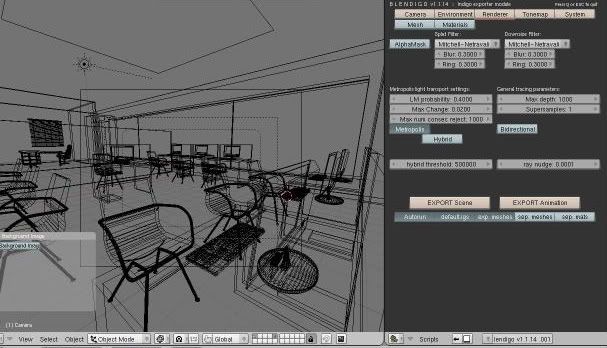
i'm using indigo 1.1.18 blendigo 1.1.14. didn't increase the supersampling value.
here are the images.
Posted: Wed Apr 01, 2009 2:17 pm
by OnoSendai
How much RAM do you have?
Posted: Wed Apr 01, 2009 2:33 pm
by gerbin
4 GB of ram.
Posted: Wed Apr 01, 2009 3:09 pm
by Borgleader
fused wrote:right, i forgot the supersampling:
width*ssf*height*ssf*32bit*3/8/1024/1024
(width*height)*ssf*32bit*3/8/1024/1024
or
(width*height)*(ssf^2)*32bit*3/8/1024/1024
Posted: Wed Apr 01, 2009 5:07 pm
by OnoSendai
Gerbin: do you have a 64 bit OS? if so try indigo 64 bit.
Posted: Wed Apr 01, 2009 6:14 pm
by gerbin
OnoSendai: 32 bit here

i tried deleting one of the chairs in the scene and it rendered well. but then i have to add more chairs

.
and more objects too.
Posted: Wed Apr 01, 2009 6:23 pm
by SATtva_
Chairs in your scene are the same. I hope you made them as instances, not mesh copies?
Posted: Wed Apr 01, 2009 6:37 pm
by Stromberg
Just so you know, with 4 gb and 32-bit OS you want get to use all your ram you will only be able to use 3.5 gb.

Posted: Wed Apr 01, 2009 11:53 pm
by SATtva_
with 4 gb and 32-bit OS
Namely, Windows OS. In Linux there is no such problem. ;)
Posted: Thu Apr 02, 2009 1:56 pm
by gerbin
thanks for the replies (i feel special hahaha).
@SATtva: that's what i did yesterday and it worked hehehe. i forgot i did shift+d in blender instead of alt+d. wahehehe.
thanks a lot guys. il try to post it here when its done so i could hear your comments. arigato minna.
