Page 1 of 2
how to make stained glass?
Posted: Sat Feb 09, 2008 3:03 am
by Vampyre
has any successfully made a stained glass material? what i'd really like is a transparent glass with different colors, but when i try to blend a transparent specular with anything it gets either faded colors or other weird errors.
I dont want just color glass, i actually want texture based color variance in the glass. i'm using indigo 1.0.4 and the coresponding blendigo. thanks in advance for any advice
Posted: Sat Feb 09, 2008 3:59 am
by Vanessa07
Not sure to understand, any reference image?

Posted: Sat Feb 09, 2008 7:24 am
by Vampyre
sure. here's an image i found on google
http://images.google.com/imgres?imgurl= ... l%26sa%3DN
notice how in the purple glass, each segment has some color variance in the glass itself, and some of the color we see is from the background. I want this result.
right now i'm trying to fake it using a blend between a diffuse transparent shader, and an image generated by blenders internal raytracer. thanks a lot for any advice or pointers
Posted: Sat Feb 09, 2008 9:07 am
by StompinTom
as of now, transparent specular materials cant be textured with color. theres the whole problem of how to map a 2d image onto a 3d volume (absorption takes thickness/volume into account, so how will the renderer know how deep the image map affects the color of the material? what about intersections? etc etc) at least thats how i understand the problem.
i'd guessed as much
Posted: Sat Feb 09, 2008 9:19 am
by Vampyre
thanks for the input

I had guessed as much. I can think of a couple of ways to get around that
problem, from a coders point of view.. but since messing with the indigo code
isn't an option i was just wondering if anyone had found a convincing way to
fake it with blended materials or something.
as it is now, i think im just going to render the scene twice, once with a
diffuse transparent, and once with a specular transparent and layer them.
Posted: Sat Feb 09, 2008 9:30 am
by dougal2
Is the image map big or complex? If not, trace over it with geometry and model every pane.
Won't blame you if you think that's too much work though

thought of that too
Posted: Sat Feb 09, 2008 11:52 am
by Vampyre
actually, that was my first plan, but then i realized, each segment/cell of glass should have color variation, not just the whole window pane. i know, im picky huh?

the layering method hack works pretty well , but i'm not sure if the color variation will survive the layering. i'll know in a couple of days when the renders are complete
Posted: Sun Feb 10, 2008 4:45 am
by Vanessa07
Something like this?
Posted: Sun Feb 10, 2008 9:58 pm
by sth
StompinTom wrote:as of now, transparent specular materials cant be textured with color. theres the whole problem of how to map a 2d image onto a 3d volume (absorption takes thickness/volume into account, so how will the renderer know how deep the image map affects the color of the material? what about intersections? etc etc) at least thats how i understand the problem.
I like the way how it is solved in other renderers (biased). You can treat texture as a shell of transparent paint on your glass. All settings could be mapped

For sss there could be also mapped "sss deepness map" which would mean at what distance from the surface color from "sss color map" would be changed into colir from "material color map"
But I don't know is it possible to follow this way. It's only my imagination
Posted: Mon Feb 11, 2008 12:09 am
by Kram1032
Interesting how your light starts out white and then suddenly gains energy when going through something absorbing
Anyway...
I think, the problem is, that absorption in Indigo is depth based. If you hit a transparent coloured plane (a perfect one without any thickness), the colour wont be absorbed at all... (except the light hits one edge of the plane and leaves through an other) as the light doesn't have any chance to be blocked by perfectly flat atoms, so to say....
of course, you could simply save both colours and blend their effect 50:50, but I think, that wouldn't be the correct approach. Who says, that the light passes through the blue part (in your pic) exactly half the time, and through the yellow part the other half?
Indigo'd need to blend the colour towards the middle of the mesh.
there then could be two ways:
1) the two colours slowly fade to a grey absorption of the strength in the middle of them (averaged percent of absorbed light)
2) the colours fade in each other.
Next problem: a solid object: there are more than two sides which affect the colour....
Indigo basically'd need to calculate a volumetric 3D colour texture, based on the values of the 2D one, on the mesh and on the UV map.
Would take forever to calculate and would use a ton of RAM, I guess...
It still would be useful
Posted: Mon Feb 11, 2008 12:41 am
by sth
Kram1032 wrote:Interesting how your light starts out white and then suddenly gains energy when going through something absorbing
Anyway...
I think, the problem is, that absorption in Indigo is depth based.
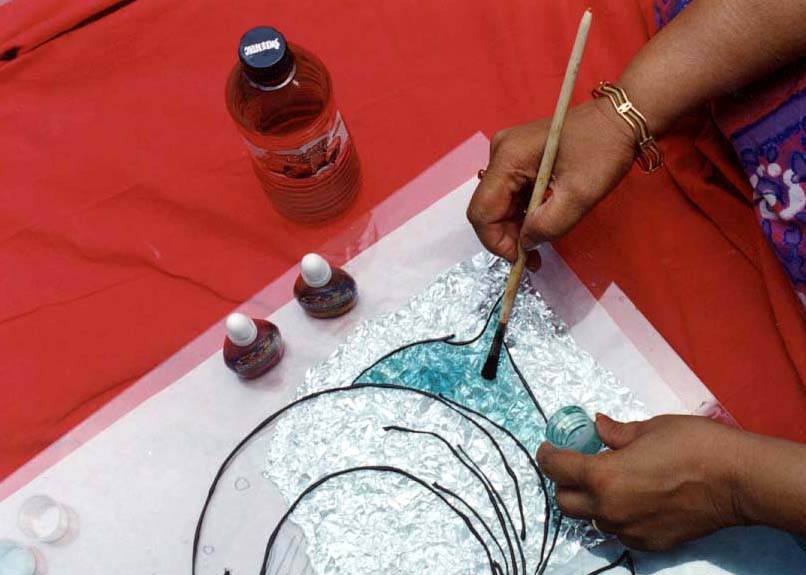
In my example i was thinking about a color as a very thin transparent coat painted over clear glass block (i skipped refraction on image)
that's why light changes color on the surface
Kram1032 wrote:of course, you could simply save both colours and blend their effect 50:50, but I think, that wouldn't be the correct approach. Who says, that the light passes through the blue part (in your pic) exactly half the time, and through the yellow part the other half?
Indigo'd need to blend the colour towards the middle of the mesh.
My idea is not to mix them in the middle of material. Color would be put directly on the shell. I think would be no need to change medium material a lot
just add on top of it kind of "absorbing layer"
this is what I "googled':
http://www.webindia123.com/craft/paint/ ... make2a.jpg
http://www.hobbycraft.co.uk/tech_pages/ ... GLASS4.jpg
http://www.christie.nhs.uk/patients/reh ... inting.jpg
http://www.thearttable.com/Classes/all4classes.jpg
there can also be 'solid' - non transparent paint - now it can be simulated by mixing with custom map glass and diffuse or phong (working now if sss is not used)
look at:
http://www.greece.k12.ny.us/commed/Phot ... inting.jpg
http://www.csc.gov.sg/HTML/Newsletter/o ... entary.jpg
http://www.whimsicalsisters.com/
As you see it can be laid on whatever material of different shape.
Effect is easily predictable.
Posted: Mon Feb 11, 2008 12:45 am
by Kram1032
I know, what your idea was.
Though, it would mean a 0 meter thick layer of colour, which would absorb 0% of the light (as that's the way, Indigo calculates it...)
That blending in the middle was an expanded idea by me, so to say...
those colours still have thickness... and quite a high absorption.
and additionally, they're impossibly used uniformly...
what *might* work, is, to use a map in this way:
two additional parameters:
- average thickness
- maximum thickness
Indigo'd automatically translate the image into absorptionvalues, based on those two values and the values of the map.
additionally, indigo'd use the map as a bumpmap, simulating the thickness of the texture (or when finally implemented: no simulating and MPD)
and it could also make the actual surface below thinner (that's why there's the average value... It'd make the surface less perfect)
one problem remains (at least, if all the stuff above actually'd work...)
What's about the IoR and stuff of the coating material? I don't think, Window Colours have about the same IoR as window glass
Posted: Mon Feb 11, 2008 1:08 am
by sth
I think that bump would complicate things a lot. (Two bumpsmaps?
one for glass and one for coat + two IORmaps

). I think that at the start it should be only one map and one control 'strength' (or as you call this - 'depth') other settings inherited.
And maybe in the future........ 'coatlike material' which could be applied to every mat?
@Kram
I don't understand one thing....

Why do we have to do 'experimental imaginative mess' in every serious topic?


Posted: Mon Feb 11, 2008 1:19 am
by Kram1032
well, the bumpmap of the coating material would be directly created from the colouring image, based on the darkness and the two values for thickness
About the 'experimental imaginative mess': why not?
Posted: Mon Feb 11, 2008 1:23 am
by sth
Oh..... I see somewhere 'need of life'

[edit]
I hope Ono's not angry about this kind of inspiration