Page 1 of 2
Posted: Sun Jan 14, 2007 10:40 am
by u3dreal
Hi radiance could you post the material as i donÄt seem to get it to work with ior other than 1.0 ...
cheers
u3dreal

Posted: Sun Jan 14, 2007 10:54 am
by u3dreal
Strange i got all the values wired in Blender...
think it will take some time to get some decent implementation..
seems for me i'm getting slower with high ior..
will check ..
thanks alot !!
cheers
u3dreal
Posted: Sun Jan 14, 2007 11:42 am
by arneoog
Posted: Sun Jan 14, 2007 11:50 am
by CTZn
Awsome Material!!!
Oh yes !
Posted: Sun Jan 14, 2007 2:49 pm
by atmmatt
*Drools*

Posted: Sun Jan 14, 2007 3:52 pm
by BZ Win
Gosh, where does everyone get that dragon model?
BTW, very cool looking, my mom thought it was a photo.
EDIT: NVM, found it.
Posted: Sun Jan 14, 2007 4:17 pm
by afecelis
Amazing! cool sex toy material, hehehehe
Like the one Duber Studio published here, For Final render Stage 1:
http://www.duber.cz/index.php?section=t ... set_02.php

Posted: Sun Jan 14, 2007 5:45 pm
by Maluminas
Your dragon is simply beautiful. SSS makes anything beautiful. Wow, i need to get to work with it

Posted: Sun Jan 14, 2007 8:46 pm
by OnoSendai
Some general tips for SSS materials:
anything but uniform spectrum type for scattering coefficient spectrum will be heaps slower than uniform. However, the absorption coefficient spectrum can be RGB with no loss of speed tho. So I suggest you give colour to your scattering by messing with the absorption RGB.
Increased the scattering coefficient will result in a greater 'SSS effect', but will slow the rendering speed.
Increasing the absorption coefficient will speed the rendering ( i think),
and make the material look denser as well.
I suggest keeping the absorption coefficient values similar to the scattering coefficient values, *unless* you're going for a milky look, where there is very little absorption.
Using a glossy_transmitter material instead of a specular material on the surface may help in acheiving a more SSS look as well.
The IOR of your SSS medium should be something like 1.5 to be physically plausible.
EDIT: copied this into a new thread in the general section.
Posted: Tue Jan 16, 2007 4:26 am
by OnoSendai
Here's a WIP:
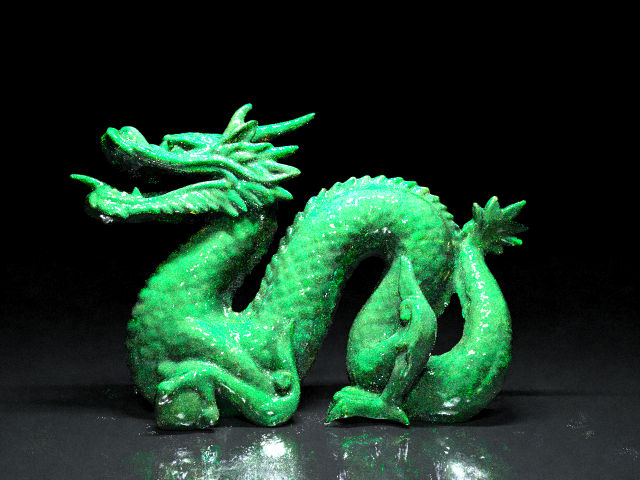
and the material:
Code: Select all
	<medium>
		<name>rubber</name>

		<ior>1.5</ior>
			<cauchy_b_coeff>0.0</cauchy_b_coeff>
			<absorption_coefficient_spectrum>
				<rgb>
					<rgb>400 100 400</rgb>
				</rgb>
			</absorption_coefficient_spectrum>
			<precedence>20</precedence>

			<subsurface_scattering>
				<scattering_coefficient_spectrum>
					<uniform>
						<value>100</value>
					</uniform>
			</scattering_coefficient_spectrum>
			<phase_function>
				<uniform/>
			</phase_function>
		</subsurface_scattering>
	</medium>

   <material>
      <name>default</name>

      <specular>
         <transparent>true</transparent>
         <internal_medium_name>rubber</internal_medium_name>
      </specular>

   </material>
Not quite the look i was going for (jade), but quite interesting nonetheless.
Probably need more forwards scattering for jade.
EDIT: according to Jensen,
"Most translucent materials
are strongly forward scattering with g > 0:7 (skin for example
has 0:7 < g < 0:9 [Gemert et al. 1989])."
So I guess I know what to code next
Posted: Fri Mar 16, 2007 11:13 pm
by danyolgiax
I've tryied those materials in indigo 0.7 with some tags adjustments... but none of them are similar at their own image!
It's normal?
Dox
Posted: Sat Mar 17, 2007 1:43 am
by Kram1032
Did you use the same scene?
Posted: Sat Mar 17, 2007 1:53 am
by danyolgiax
<medium>
<name>sphere</name>
<precedence>10</precedence>
<basic>
<ior>1.2</ior>
<cauchy_b_coeff>0</cauchy_b_coeff>
<absorption_coefficient_spectrum>
<rgb>
<rgb>30 20 0.5</rgb>
</rgb>
</absorption_coefficient_spectrum>
<subsurface_scattering>
<scattering_coefficient_spectrum>
<rgb>
<rgb>100 5 180</rgb>
</rgb>
</scattering_coefficient_spectrum>
<phase_function>
<uniform>40</uniform>
</phase_function>
</subsurface_scattering>
</basic>
</medium>
<material>
<name>sphere</name>
<specular>
<transparent>true</transparent>
<internal_medium_name>sphere</internal_medium_name>
</specular>
</material>
Posted: Sat Mar 17, 2007 2:04 am
by CTZn
Subsurface scattering, like absorbtion, is based on distances, so again, size matters (yes I have a problem with scale
)
Posted: Sat Mar 17, 2007 2:56 am
by danyolgiax
ok... but...
i think this is the same XML of the pink dragon in the first post of this topic...
<medium>
<name>sphere</name>
<precedence>20</precedence>
<basic>
<ior>1.45</ior>
<cauchy_b_coeff>0</cauchy_b_coeff>
<absorption_coefficient_spectrum>
<rgb>
<rgb>2 0 10</rgb>
</rgb>
</absorption_coefficient_spectrum>
<subsurface_scattering>
<scattering_coefficient_spectrum>
<rgb>
<rgb>2 12 1</rgb>
</rgb>
</scattering_coefficient_spectrum>
<phase_function>
<uniform>4</uniform>
</phase_function>
</subsurface_scattering>
</basic>
</medium>
<material>
<name>sphere</name>
<specular>
<transparent>true</transparent>
<internal_medium_name>sphere</internal_medium_name>
</specular>
</material>
but this is the result:


