Page 1 of 2
My living-room
Posted: Mon Feb 12, 2007 11:20 pm
by Kåre
Hey everybody. I'm currently making a model of my livingroom and I just wantet to show the progress so far. I'm still making small changes every now and then so it's not finished yet. I know the curtains are completly identical but besides that I would like some C&C. BTW it has rendered for approx 12 hours. Enjoy:
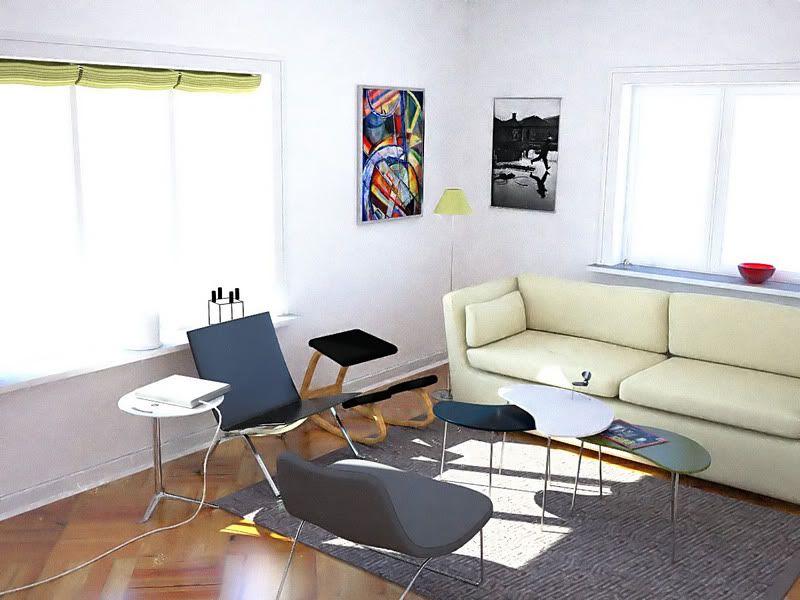
Oh and a giant thanks to Ono for making this render!
Posted: Mon Feb 12, 2007 11:28 pm
by manitwo
nice! i like it

Posted: Tue Feb 13, 2007 2:04 am
by OnoSendai
awesome!
Posted: Tue Feb 13, 2007 2:14 am
by afecelis
nice! window lights burning a bit too much perhaps?
Have you got a reference pic?
keep it up!

Posted: Tue Feb 13, 2007 3:50 am
by StompinTom
looks very burnt out, but otherwise very nice!
Posted: Tue Feb 13, 2007 4:12 am
by CTZn
Nice pic Kåre !
Can you post your tonemapping settings please ? I wonder if we can improve these parameters... Hdri or physical sky ?
Posted: Tue Feb 13, 2007 4:22 am
by Kåre
Thanks for the comments! I'll take a reference picture soon and post it.
@CTZn: my settings(They are quite random, so if anyone has some advice I'll be greatful):
Code: Select all
<tonemapping>
		<reinhard>
			<pre_scale>3.000000</pre_scale>
			<post_scale>7.000000</post_scale>
			<burn>3.000</burn>
		</reinhard>
	</tonemapping>
and it's physical sky
Posted: Tue Feb 13, 2007 5:05 am
by drBouvierLeduc
Code: Select all
<pre_scale>3.000000</pre_scale>
<post_scale>7.000000</post_scale>
post_scale is too high I think, that's why the image seems burned.
I would increase pre_scale a bit, and lower post_scale if I where you.
Posted: Tue Feb 13, 2007 5:44 am
by zsouthboy
How did you model the couch? What software?
I haven't been able to get that "soft" cushion look myself. I end up with bricks rofl.
Posted: Tue Feb 13, 2007 6:49 am
by CTZn
I agree with drBouvierLeduc, try same value for <pre_scale> and <burn>, around 8 for meshlights but for sun I'm not sure. Let <post_scale> alone at 1 or 1.3. My bet.
Edit: or better, set <burn> to twice <pre_scale>. Works good here.
Posted: Tue Feb 13, 2007 6:52 am
by VictorJapi
Soon you will not to be afraid of the tonemapping scales

Posted: Tue Feb 13, 2007 7:25 am
by Kåre
Thanks for the help with the tonemapping. I'm playing around with it right now.
@zsouthboy: the couch is modeled in blender like the rest of the scene. If it helps you there's a wire
here.
I think one of the most important thinks when making a couch is the material. It can't look soft with a shiny material.
@VictorJapi: A asume you refer to the comming up GUI for tonemapping. I can't wait.
Posted: Tue Feb 13, 2007 9:16 am
by DaveC
Brilliant render. I can spend hours looking at it for evidence that it's a render. Very nice. You have quite an impressive photobucket portfolio going on there. Wanna share your fender blender model?
Posted: Tue Feb 13, 2007 11:02 am
by neepneep
Did you save an EXR? If you did then you should try combine 2 exposures from the EXR in photoshop - ie. have one with a low exposure which shows the windows and the outside minus the burn and one with a moderate exposure to get a nice intensity for the interior?
Posted: Wed Feb 14, 2007 3:36 am
by Kåre
Thanks again for the nice comments.
@neepneep. I didn't save the EXR. I don't even have photoshop (I'm really(!) bad at postprocessing)
@DaveC: Thanks a lot. As long as you only use it for personel stuff you can have the fender. Just give me a mail-adress and I'll send it (if I can find the .blend, it's quite old)
Here's just another pic from a different angel and with tonemapping:
Code: Select all
         <pre_scale>30.000000</pre_scale>
         <post_scale>1.000000</post_scale>
         <burn>60.000</burn>
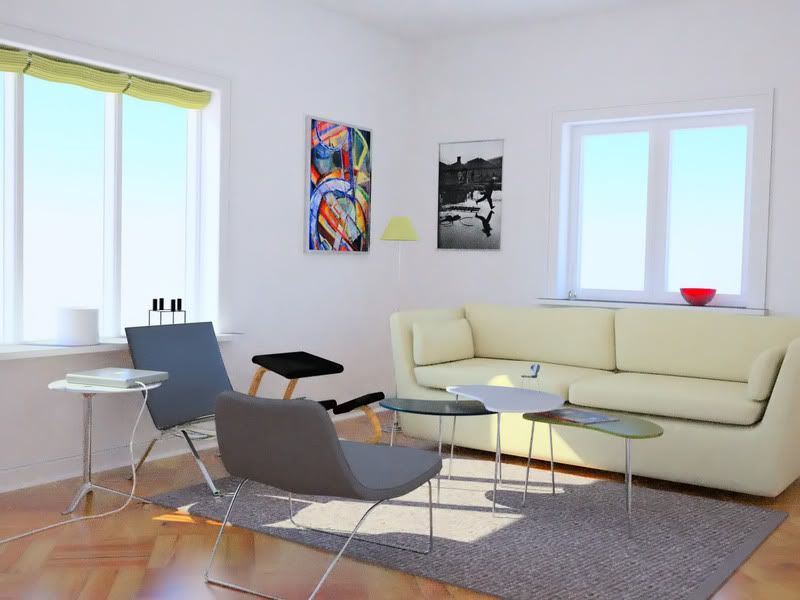
I know the sofa is floating - you couldn't see it from the other angle so I forgot to model some legs...
