Page 1 of 1
Alpha mpas in skindigo
Posted: Tue Jul 08, 2008 11:25 am
by neo0.
Is this currently pssible? I wnted to use them for things like labels on glass bottles.
Posted: Tue Jul 08, 2008 2:28 pm
by kwistenbiebel
The transparency of a .png (alpha) image in a SU material will not render automatically in Indigo.
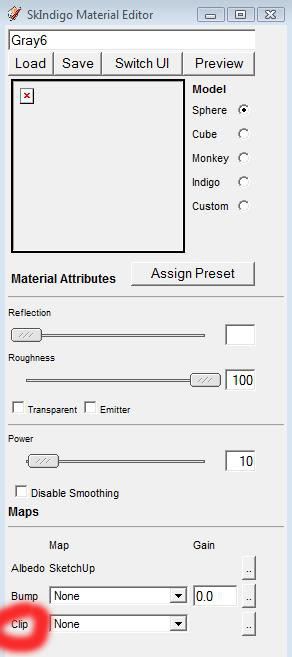
The solution for this is to load a clipmap image in the material editor.
A clip map is a black&white image: the white parts indicate the areas that will be clipped.
Posted: Sun Jul 20, 2008 10:37 am
by kwistenbiebel
Well Neo....
You got your answer 10 days ago.
Did it help you in any way?
B&W
Posted: Tue Jul 22, 2008 4:07 am
by danbush
When you say white will be clipped, do you mean the white will be solid and the black will be open?
Posted: Tue Jul 22, 2008 5:53 am
by kwistenbiebel
The clip map or transparency map tends to resemble the texture map closely, except that it consists of differing shades of gray (including black and white). The transparency map determines where the texture map will be applied. Areas in the map that are white will cause the corresponding region of the model to become invisible (i.e. transparent); areas that are black will be opaque, and areas that are gray will have varying degrees of transparency dependent on the shade of gray.
Posted: Tue Jul 22, 2008 6:55 am
by danbush
So it's not possible (right now) to have a image map that will achieve a surface color and act as an alpha map as well?
i.e. a piece of green perforated metal
Posted: Thu Jul 24, 2008 6:19 am
by crojack
the way I would do it, which probably isn't the best, is to take that green perforated metal into photoshop and make ti a BW image, white being the holes, black being the metal.
and that is your clipmap
load it into sketchup and make sure that it is the same size as the green perf. metal material and assign it to the green perf. metal.
Posted: Thu Jul 24, 2008 6:26 am
by neo0.
kwistenbiebel wrote:Well Neo....
You got your answer 10 days ago.
Did it help you in any way?
Sure, it helped. Thansk for the the reply.

Posted: Fri Jul 25, 2008 10:38 am
by kwistenbiebel
Any time.
@danbush,
I would do it the way Crojack describes.
You could also assign a second uv-set for the clip map. (advanced feature).
I think it is described in the tutorial Sketchup file.
By the way @Whaat: wouldn't it be a good idea to make a sticky thread in this section with links to all current Skindigo tutorials and the SU tut file?
Posted: Sun Oct 26, 2008 4:51 am
by 2kemon
...the clip maps work great, but I was actually wondering if it would be possible to make PNG images work alone?
Apparently the podium developer worked out a way to render PNG images without the need for at clip map. So I thought maybe the same could be done with indigo and skindigo. Naturally, if it isn't supported in indigo it can't be in skindigo
