Page 1 of 2
Why do materials render darker when made in to phong?
Posted: Fri Mar 09, 2007 3:02 am
by kwistenbiebel
Hi all,
Everytime I render a wooden floor as a diffuse material, colour is fine.
But when I want to make it more shiny (=make it a phong), suddenly the rendered output of that floor get's darker and the texture detail get's lost.
Somehow I get the impression that Skindigo does a 'double' gamma correction on textured phongs with specular assigned.
I see this issue in all the renderings that are posted here when wood floors etc. are being used.
I have got an example that is still rendering. i will post it when noise is acceptable.
I use following Phong settings:
specular 0.02
multiplier: 3000
fresnel scale: 1
Anyone has an explanation?
BTW, the issue I experience only counts for 'textured' Phong materials.
Plain 'colour' phong materials seem to render fine.
Thanks in advance
Posted: Fri Mar 09, 2007 3:11 am
by OnoSendai
There were a couple of issues in Indigo 0.6 that make phong materials too dark:
* double application of gamma curve if bump map is used
* < 1 diffuse albedo multiplier didn't help either.
To solve this problem, u need to use Indigo 0.7 test 5 (or any of the latest 0.7 tests).
Unfortunately, SkIndigo only exports to indigo 0.6, but I think Whaat is working on an 0.7 exporter perhaps ?

Posted: Fri Mar 09, 2007 3:35 am
by kwistenbiebel
OnoSendai wrote:There were a couple of issues in Indigo 0.6 that make phong materials too dark:
* double application of gamma curve if bump map is used
* < 1 diffuse albedo multiplier didn't help either.
To solve this problem, u need to use Indigo 0.7 test 5 (or any of the latest 0.7 tests).
Unfortunately, SkIndigo only exports to indigo 0.6, but I think Whaat is working on an 0.7 exporter perhaps ?
Thanks Onosendai for the clear answer.
Would brightening the texture in Sketchup help as a workaround for now?
regards,
kwistenbiebel
Posted: Fri Mar 09, 2007 12:00 pm
by Richard
I have to say I haven't had any luck getting the right sort of reflections from any materials as the terminology and acceptable values to achieve the desired result mean nothing to me!
I know Indigo is in beta but I do hope that many of this terminology is simplified so that those without the experience or time to experiment to understand the outcome (99% of the sketchup community) will get some desired results quicker.
Must also say I wish the darn render application community would derive some common terminology!!!!! I'm starting to feel like I should go and do a Uni course on physics just to read a new manual. Like Phong here that is a type of foot wear or more recently a string Gstring - you know the ones chicks wear and when they bend over it shows out the top of their jeans and it takes all restraint not to grab it an give them a wedgie!
Posted: Fri Mar 09, 2007 2:44 pm
by Whaat
Richard wrote:I have to say I haven't had any luck getting the right sort of reflections from any materials as the terminology and acceptable values to achieve the desired result mean nothing to me!
I anticipated this problem which is why I provided the material presets. I know there aren't very many but many real-world materials can created by using the presets as a starting point. If you don't understand the Indigo settings, I suggest reading the Indigo WIP manual. It only takes a couple of minutes. Check out the Blender tutorial as well. It is helpful in learning about materials.
Whaat
Posted: Fri Mar 09, 2007 7:40 pm
by kwistenbiebel
Richard wrote:... Like Phong here that is a type of foot wear or more recently a string Gstring - you know the ones chicks wear and when they bend over it shows out the top of their jeans and it takes all restraint not to grab it an give them a wedgie!

You are right Richard.
Some sort of unified language in 'render world' would be appreciated.
And yes, I also have problems getting those materials rendered the way I would like it.
The biggest problem seems to be getting a 'phong' ('thong'?) material right.
Browsing the forum, i can't find real good examples of a realistic wooden floor, good stone tiling, etc... Most of the time colours are off or the textures get washed out when trying to create subtle speculars.
@Whaat,
You have written a very good plug-in that really works intuitive.
The presets are great, although i miss some more common (architectural) material presets like chrome, wooden floor, floor tile...
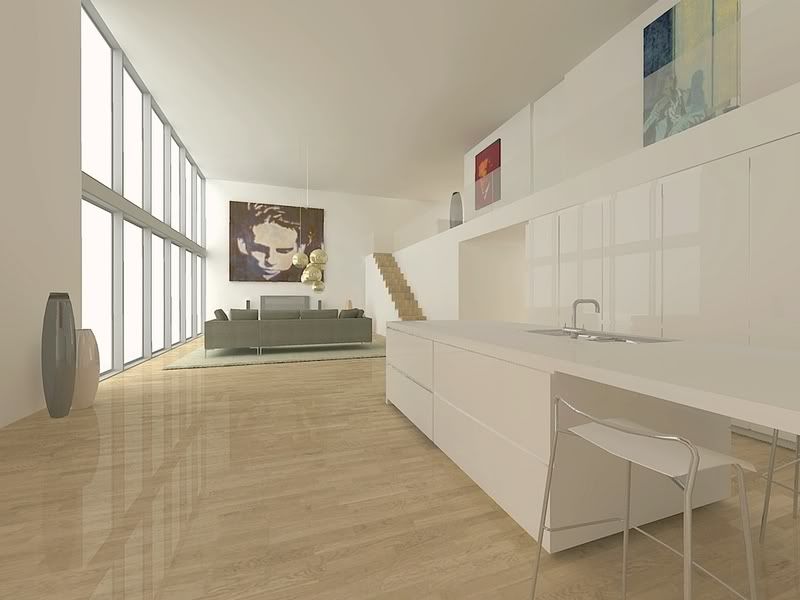
here is a rendering i did with indigo where you can see the trouble i have to get that floor right. I tried brightening the texture in SU but still colour is off and texture is washed out:
Posted: Fri Mar 09, 2007 7:46 pm
by kwistenbiebel
As a reference a rendering with 'unbiased' Podium render (3 hours).
The wooden floor looks very different:
Posted: Sat Mar 10, 2007 12:22 am
by manitwo
Richard wrote:I have to say I haven't had any luck getting the right sort of reflections from any materials as the terminology and acceptable values to achieve the desired result mean nothing to me!
I know Indigo is in beta but I do hope that many of this terminology is simplified so that those without the experience or time to experiment to understand the outcome (99% of the sketchup community) will get some desired results quicker.
Must also say I wish the darn render application community would derive some common terminology!!!!! I'm starting to feel like I should go and do a Uni course on physics just to read a new manual. Like Phong here that is a type of foot wear or more recently a string Gstring - you know the ones chicks wear and when they bend over it shows out the top of their jeans and it takes all restraint not to grab it an give them a wedgie!
hi richard,
If you want to use indigo (or any other renderer) you will have to learn some basic things. I know, there might be too less documentation for indigo but terms like "diffuse" and "phong" are a common standards which you have to know. You also could have a look on the manuals of maxwell or fryrender (diffuse, phong and such are great explained). Or you could search the forum! nearly everthing was discussed x-times. This is really not meant in an offensive way but you have to put some effort in learning how indigo works (and every other renderer too)!

Posted: Sat Mar 10, 2007 12:26 am
by manitwo
@kwistenbiebel: if you want a floor like your podium render don't use a bumpmap, lower the specularity and raise the exponent to 100000. (but i think the floor in the indigo one looks muuuch better and more real)
Posted: Sat Mar 10, 2007 1:48 am
by kwistenbiebel
I will try those suggestions.
Bump maps aren't supported in Podium yet. When next release is out (will have bump) i will rerender the scene.
The Podium scene was to demonstrate the floor texture that is used (the colour is close to the colour in sketchup) and to show the amount of detail the texture has (and is lost in the indigo rendering).
Cheers,
and have a nice weekend,
kwistenbiebel
Posted: Sat Mar 10, 2007 4:30 am
by manitwo
kwistenbiebel wrote:
[...]
and to show the amount of detail the texture has (and is lost in the indigo rendering).
[...]
i think the details will come when the noise goes

kwistenbiebel wrote:Cheers,
and have a nice weekend,
kwistenbiebel
you too
Posted: Mon Mar 12, 2007 11:38 am
by Richard
manitwo wrote:
hi richard,
If you want to use indigo (or any other renderer) you will have to learn some basic things. I know, there might be too less documentation for indigo but terms like "diffuse" and "phong" are a common standards which you have to know. You also could have a look on the manuals of maxwell or fryrender (diffuse, phong and such are great explained). Or you could search the forum! nearly everthing was discussed x-times. This is really not meant in an offensive way but you have to put some effort in learning how indigo works (and every other renderer too)!
I know but I'm lazy. Man if I have to do all that reading it will interupt my sitting on the couch drinking beer and rubbing my fat tummy!
Posted: Thu Apr 19, 2007 4:42 pm
by gorgon
I know but I'm lazy. Man if I have to do all that reading it will interupt my sitting on the couch drinking beer and rubbing my fat tummy!
I totally agree with the sentiment (not rubbing my fat tummy) but the 'terminology' in rendering could do with some radical revision
Posted: Thu Apr 19, 2007 5:10 pm
by Richard
Gorgon
What are you doing here mate? Making progress?
Posted: Fri Apr 20, 2007 12:02 pm
by gorgon
Hi Richard
yes, making progress, got a render out that looks okayish, so getting there, slowly. I find Indigo to be good but the documentation, explanations (especially with sketchup and for render novices) to be poor. I was here trying to glean any more tips and tricks. especially material settings like glass and kwistenbiebel's lovely shiny floors
(Thanks for your email haven't had time to reply yet but will soon).
